AI Receptionist for Law Firms: What It Does, What It Costs, and How to Choose (2026)
An AI receptionist for law firms is software that answers your firm's phone in a natural voice, asks your screening questions, transfers good callers to you, books consultations, and sends a summary of every call. Public prices checked Oct 29, 2026 ran from a free tier to over $1,000 a month for large plans.
In a secret-shopper study in Clio's 2019 Legal Trends Report, 39% of calls to law firms went to voicemail, and more than half of the firms didn't respond to those voicemails within 72 hours. In the same report, 79% of surveyed consumers said they expected a response within 24 hours (Clio press release, Oct 21, 2019). This guide explains what an AI receptionist for law firms does, what it costs (with a table we compiled from provider pricing pages on Oct 29, 2026), and how to choose.
What is an AI receptionist for a law firm?
An AI receptionist for a law firm is a phone answering service run by conversational AI instead of a person. It picks up on the first ring at any hour, follows a script your firm approves, gathers intake details, and then transfers the caller, books a consultation, or takes a message. Your attorneys still make every legal decision.
How is it different from voicemail or an in-house receptionist?
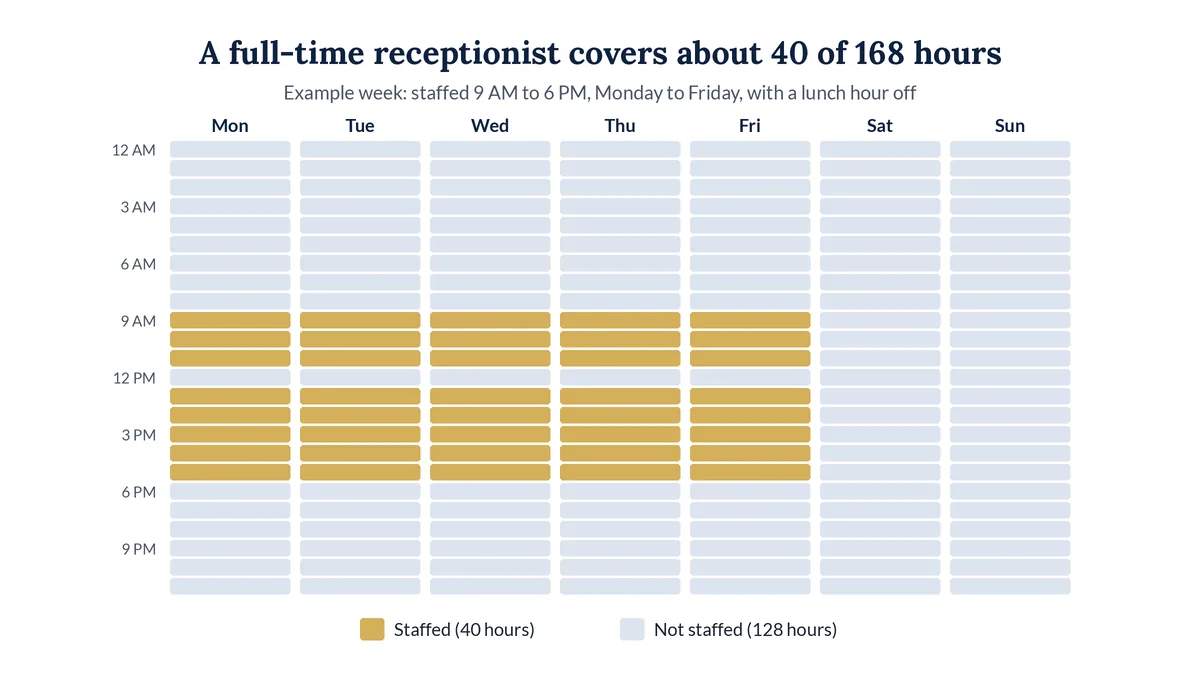
An auto-attendant is a phone menu that only routes calls, and voicemail just waits for you. A full-time receptionist covers about 40 of the 168 hours in a week. An AI receptionist holds a real conversation at any hour.
What should an AI receptionist never do?
- Give legal advice or predict how a case will turn out
- Decide conflicts of interest or promise that the firm will take a case
- Quote fees, unless the firm approved the exact wording
- Pretend to be a person
- Ask for Social Security numbers, card numbers, or passwords
What happens on a call with an AI receptionist?
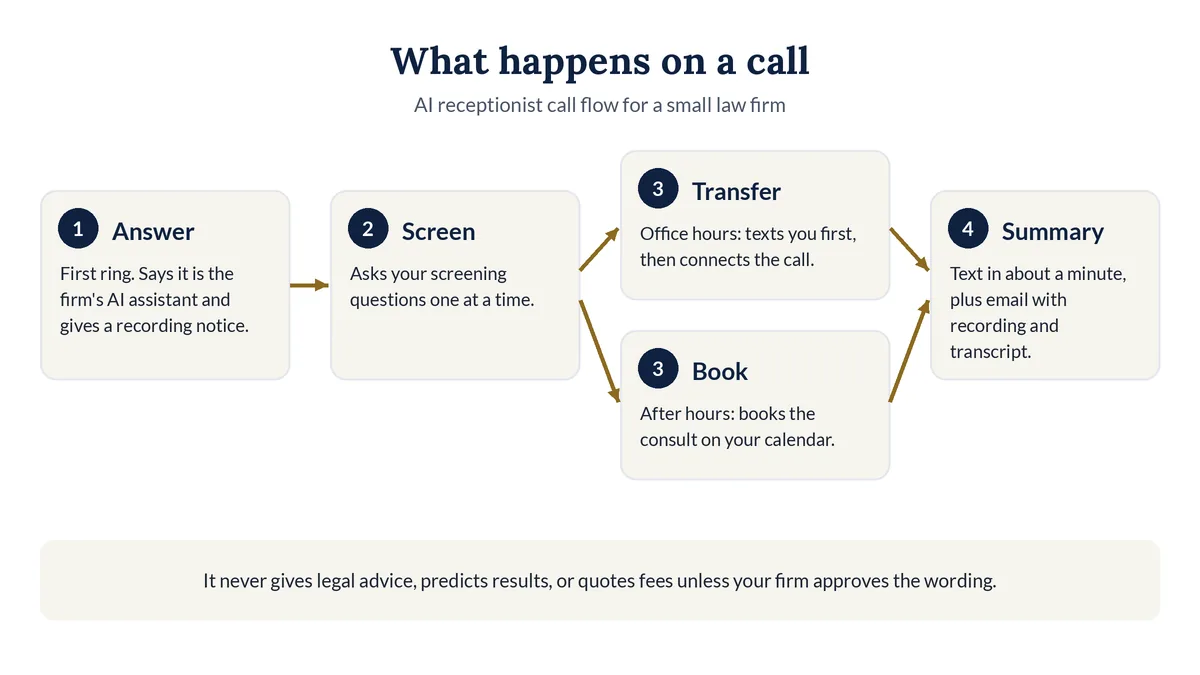
On a typical call, the AI answers on the first ring, says it is the firm's AI assistant and that the call is recorded, and asks your screening questions. Then it transfers the caller to you, books a consultation on your calendar, or takes a message. You get a summary, the recording, and a transcript.
Here is a fictional call with Legal Touch AI:
- Answer on the first ring with an AI disclosure and recording notice: "Thank you for calling Smith Family Law. I'm the firm's AI assistant, not a person. This call is recorded so the firm can follow up with you. Is that OK?"
- Ask your screening questions one at a time: new or current client, what happened, when, which county, whether another attorney is involved, and contact details.
- Sort the call. A caller you can't help hears a polite referral you provide.
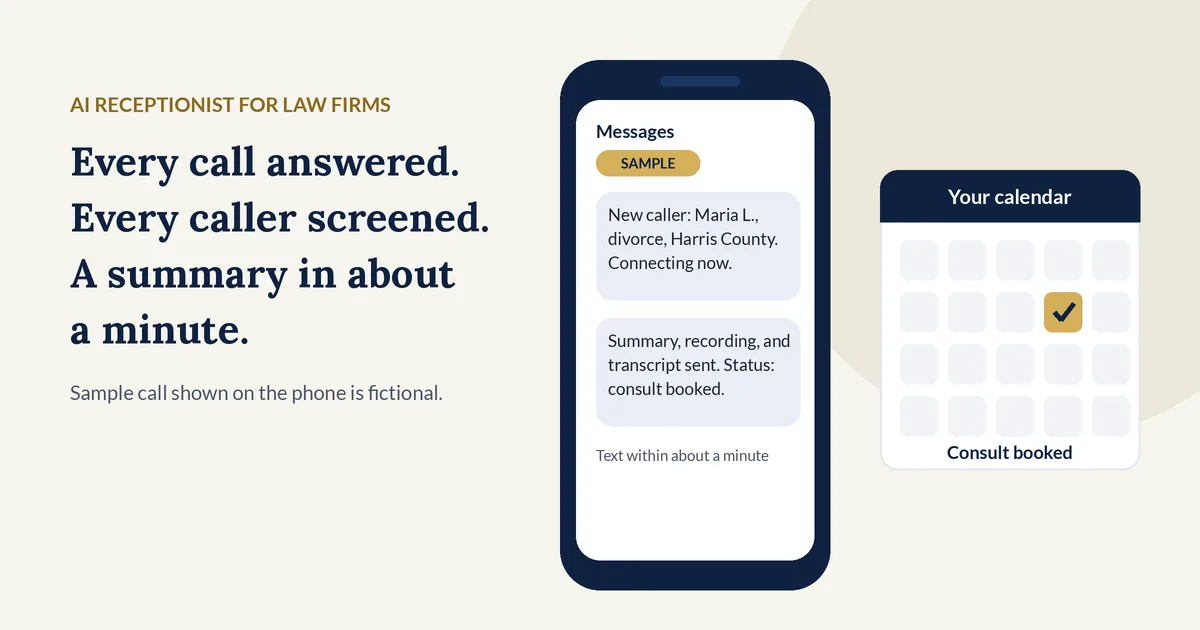
- Text you before a live transfer during office hours: "New caller: Maria L., divorce, Harris County. Connecting now." If you don't answer by the third ring, it books a time instead.
- Book the consult after hours on your Google or Outlook calendar and text the caller a confirmation.
- Flag urgent calls using your definition, such as an arrest or a court date tomorrow.
- Send the summary: a short text within about a minute, plus an email with every answer, the recording, and the transcript.
See one full after-hours call in how a call works, step by step.
What are the benefits of an AI receptionist for a small law firm?
For a firm with 1 to 10 attorneys, the main benefits are coverage and consistency. Calls get answered at night, on weekends, at lunch, and on court days. Every caller is asked the same intake questions. You keep your own phone number, and you can turn call forwarding off at any time.
- Fast follow-up. A text summary in about a minute.
- Fewer lost hang-ups. Missed-call text-back texts callers who hang up early.
- No new phone system. You forward your existing number.
AI receptionist vs live answering service: which is better?
Neither is better for every firm. An AI receptionist usually fits best for steady after-hours coverage, consistent screening, and booking at a predictable price. A live answering service often fits better when callers are in crisis, want a human voice, or your intake needs judgment calls. Many providers now offer a mix of both.
Public prices checked on each provider's own pricing page, Oct 29, 2026
| Service | Who answers | Billing unit | Public price | Setup fee |
|---|---|---|---|---|
| Smith.ai AI Receptionist | AI, with live agents as backup | Per call | Free plan with 25 calls; Pro $150/month for 75 calls; Enterprise from $500/month for 300 calls | None listed |
| Ruby | Live people | Per receptionist minute | $250/month for 50 minutes; $395 for 100; $720 for 200; $1,725 for 500 | None, per Ruby |
| Abby Connect | People, AI, or both | Per "Abby Minute" (an AI minute counts as half) | $164/month for 50 Abby Minutes; $329 for 100; $599 for 200 (up to 400 AI minutes); $1,380 for 500 | None, per Abby |
| Answering Legal | Live legal receptionists | See their pricing page | See their pricing page (shown after a contact form) | None, per their page |
| Lexidesk | AI, built for law firms | Flat monthly, based on volume | See their pricing page (quoted after a call) | Not listed |
| My AI Front Desk (Frontdesk) | AI, general business | Flat monthly with minutes | $99/month, or $79/month billed annually, for 200 voice minutes | None listed |
Prices change, so check each page before you buy.
When is a live receptionist the better choice?
A live receptionist is better when many callers are in crisis, when intake needs judgment that is hard to write as rules, or when you want a person on every call. Then Ruby or Answering Legal may suit you better than any AI service, including ours.
When is an AI receptionist the better choice?
AI fits when most missed calls come after hours or during court and your screening questions repeat. To test AI cheaply on your own, Smith.ai's free plan or Frontdesk's $99 plan is a lower-cost start. Legal Touch AI fits firms that want it built, run, and tuned for them.
How much does an AI receptionist for a law firm cost?
On Oct 29, 2026, small-firm tiers ranged from a free 25-call plan at Smith.ai to $720 a month for 200 live minutes at Ruby, and larger plans passed $1,000 a month. Managed services that build and run the receptionist for you often add a setup fee. Compare the first-year total, not the monthly headline.
What hidden costs should you ask about?
Ask about the rate past your plan, whether spam calls count, texting registration, Spanish, case software integration, and human backup.
First-year cost at a sample tier (our compiled table)
| Service and sample tier | Monthly | Setup | First-year total | Included each month | Cost per included unit |
|---|---|---|---|---|---|
| Frontdesk Business-in-a-Box | $99 | $0 | $1,188 | 200 voice minutes | $0.50 per minute |
| Smith.ai Pro | $150 | $0 | $1,800 | 75 calls | $2.00 per call |
| Abby Connect Professional (all AI) | $599 | $0 | $7,188 | 400 AI minutes | $1.50 per AI minute |
| Ruby, 200 minutes | $720 | $0 | $8,640 | 200 live minutes | $3.60 per minute |
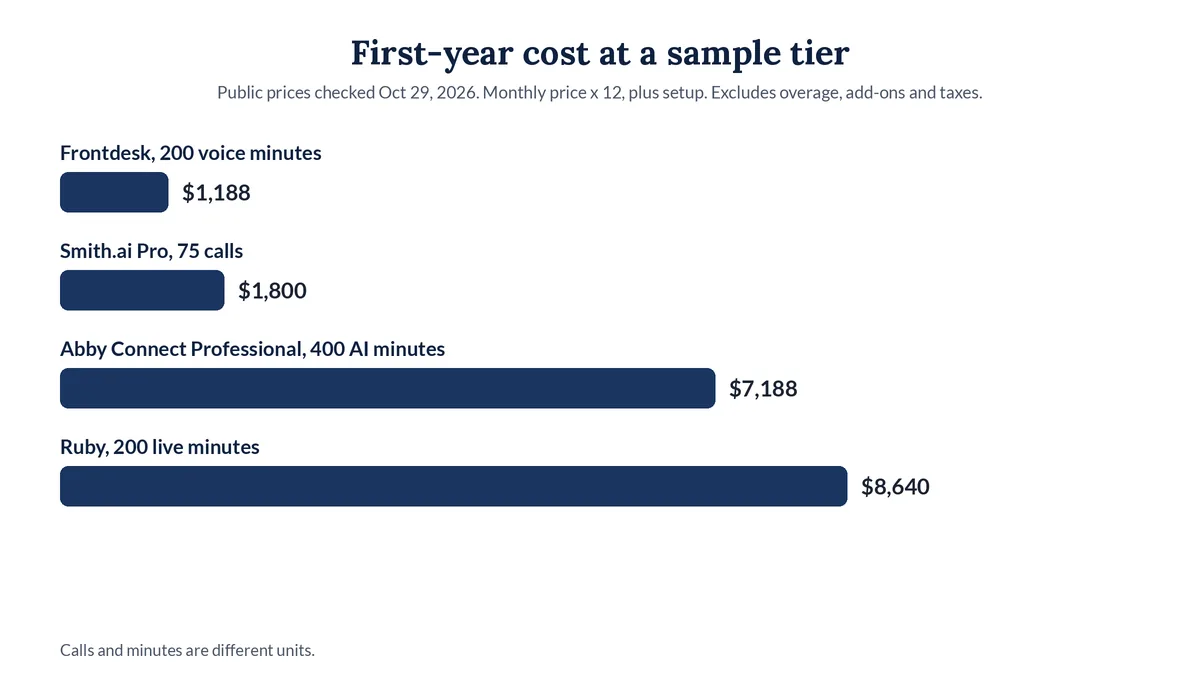
First-year total is the monthly price times 12, plus setup, without overage, add-ons, annual discounts, or taxes. Calls and minutes are different units.
Where Legal Touch AI fits
Legal Touch AI starts at $149 a month if you set it up yourself, or $495 a month plus a $995 setup if we build and run it. See Legal Touch AI plans and pricing.
Is it ethical for a law firm to use an AI receptionist?
Generally yes, if the firm supervises it. ABA Formal Opinion 512 (July 29, 2024) says lawyers using generative AI must understand the tool, protect client information, and supervise its use. Florida Bar Ethics Opinion 24-1 adds that AI chatbots talking with clients or third parties must say they are AI, not a lawyer or employee.
This is general information, not legal advice. Check your state bar's rules.
Tell callers they are talking to AI
Florida Bar Ethics Opinion 24-1 (Jan 19, 2024) (advisory) says AI chatbots that talk with clients or third parties must disclose that they are AI, not a lawyer or employee. Saying so in the first sentence is the honest default everywhere.
Give a recording notice
California Penal Code section 632 bars recording a confidential communication without the consent of all parties, and several other states have similar rules. Give a notice at the start of every call.
Protect prospective client information
ABA Formal Opinion 512 stresses confidentiality, and the ABA's summary notes that similar protections extend to prospective clients. Ask any provider where recordings are stored and who can see them.
Be careful with outbound AI calls
In a Declaratory Ruling released Feb 8, 2024, the FCC confirmed that AI-generated voices count as an "artificial or prerecorded voice" under federal robocall law, so outbound AI calls generally need the called party's prior express consent. Legal Touch AI answers incoming calls and only places reminder calls you turn on, to people who booked or asked for a callback.
What questions should you ask before choosing an AI receptionist?
Ask who writes and changes the script, whether it can transfer calls live, whether it books on your calendar, what happens after hours, how fast summaries arrive, what overage costs, how long the contract runs, and who can see your recordings. Get every answer in writing before you sign anything.
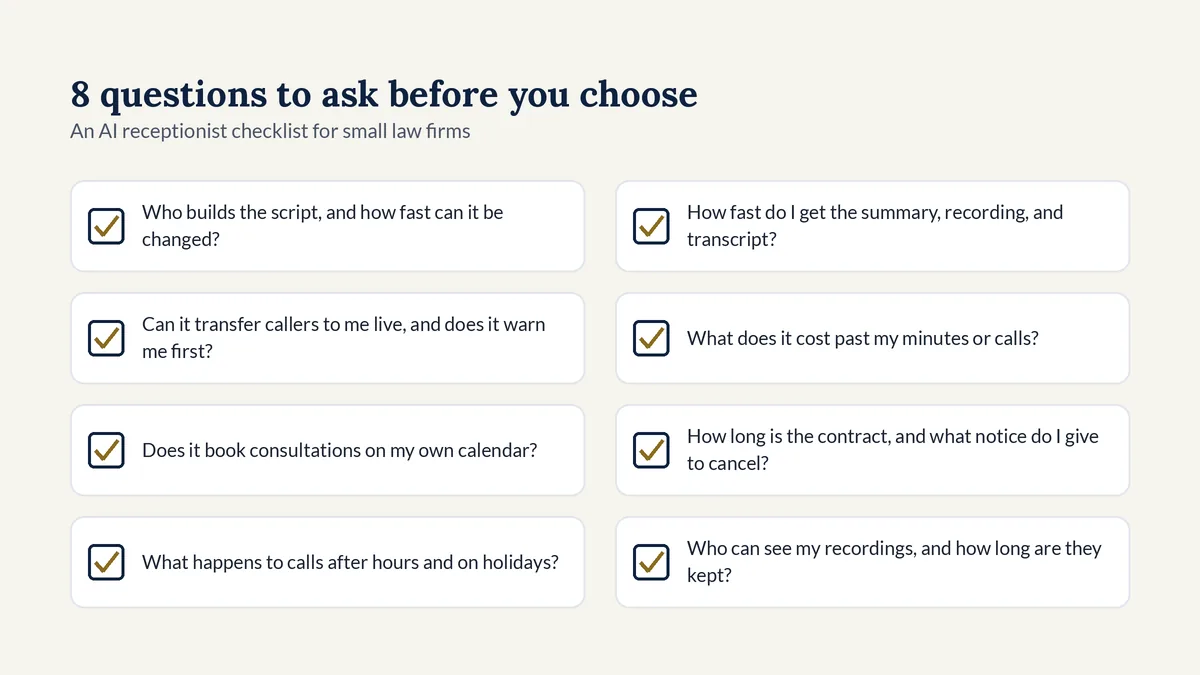
- Who builds the script, and how fast can it be changed?
- Can it transfer callers to me live, and does it warn me first?
- Does it book consultations on my own calendar?
- What happens to calls after hours and on holidays?
- How fast do I get the summary, recording, and transcript?
- What does it cost past my minutes or calls?
- How long is the contract, and what notice do I give to cancel?
- Who can see my recordings, and how long are they kept?
How do you set up an AI receptionist in about a week?
Most of the work is deciding what the AI should say. Write your screening questions, connect your calendar and alerts, test the calls yourself, and then forward your number. With Legal Touch AI, our goal is to have you live within about a week after the kickoff call.
- Write your screening questions and your definition of an urgent call.
- Choose who takes live transfers, and during which hours.
- Connect your Google or Outlook calendar for consult booking.
- Approve the greeting, the AI disclosure, and the recording notice.
- Test calls on a private line and fix what sounds wrong.
- Forward your number with your phone company once you sign off.
- Review early summaries and ask for script changes.
Why we wrote this guide
Legal Touch AI comes from the team behind Legal Touch. We set it up on our own phone lines first, screening callers and booking callbacks, and now we set it up for small law firms. Read more about our team.
Hear it answer a call. Book a 15-minute demo to hear a live call.
Related guides
Frequently asked questions
Will callers know they are talking to AI?
Yes, if the service is set up properly. Legal Touch AI says it is your firm's AI assistant in its first sentence, on every call. Florida Bar Ethics Opinion 24-1 says client-facing AI chatbots must identify themselves as AI, and we follow that practice everywhere, whatever state your firm is in.
Can an AI receptionist give legal advice?
No. An AI receptionist collects facts, then transfers the caller, books a consultation, or takes a message. Legal Touch AI never gives legal advice, never predicts how a case will turn out, and never quotes fees unless your firm approves the exact wording. Legal judgment always stays with your attorneys.
How much does an AI receptionist cost for a law firm?
Public prices checked on Oct 29, 2026 ranged from a free 25-call plan to over $1,000 a month for large plans, and some managed plans add a setup fee. Legal Touch AI starts at $149 a month for self-setup, or $495 a month plus a $995 setup if we build and run it.
Can an AI receptionist transfer calls to me live?
Yes. During your office hours, Legal Touch AI texts you the caller's name and need, then rings your cell or desk phone. If you don't answer by the third ring, it goes back to the caller, books a time instead, and sends you a missed transfer text.
Do I have to change my phone number or carrier?
No. You keep your number and your phone company. You forward your calls to the AI receptionist, and you can switch the forwarding off at any time, which sends calls straight back to your office. Setup includes call forwarding instructions for your phone company.
Who can see the call recordings and intake details?
Your firm gets every summary, recording, and transcript by text, email, and in your dashboard, and the call records belong to your firm. How long records are kept, and how you export or delete them, is set in the service agreement you receive before activation.
Legal Touch AI is not a law firm and does not provide legal advice. This article is general information. Using Legal Touch AI does not create an attorney-client relationship.
Sources (checked Oct 29, 2026)
- Clio, Legal Trends Report press release (Oct 21, 2019): https://www.clio.com/about/press/clios-legal-trends-report-reveals-law-firms-struggle-to-respond-to-client-inquiries/
- ABA Formal Opinion 512 (July 29, 2024): https://www.americanbar.org/content/dam/aba/administrative/professional_responsibility/ethics-opinions/aba-formal-opinion-512.pdf
- ABA news release on Opinion 512 (July 29, 2024): https://www.americanbar.org/news/abanews/aba-news-archives/2024/07/aba-issues-first-ethics-guidance-ai-tools/
- Florida Bar Ethics Opinion 24-1 (Jan 19, 2024): https://www.floridabar.org/etopinions/opinion-24-1/
- California Penal Code section 632: https://leginfo.legislature.ca.gov/faces/codes_displaySection.xhtml?lawCode=PEN§ionNum=632
- FCC Declaratory Ruling FCC-24-17 (released Feb 8, 2024): https://docs.fcc.gov/public/attachments/FCC-24-17A1.pdf
- Pricing pages: smith.ai/pricing/ai-receptionist, ruby.com/pricing, abby.com/pricing, answeringlegal.com/answering-service-pricing-plans, lexidesk.ai/pricing, myaifrontdesk.com/pricing