Legal Intake Answering Service: How to Screen Callers Without Losing Good Cases
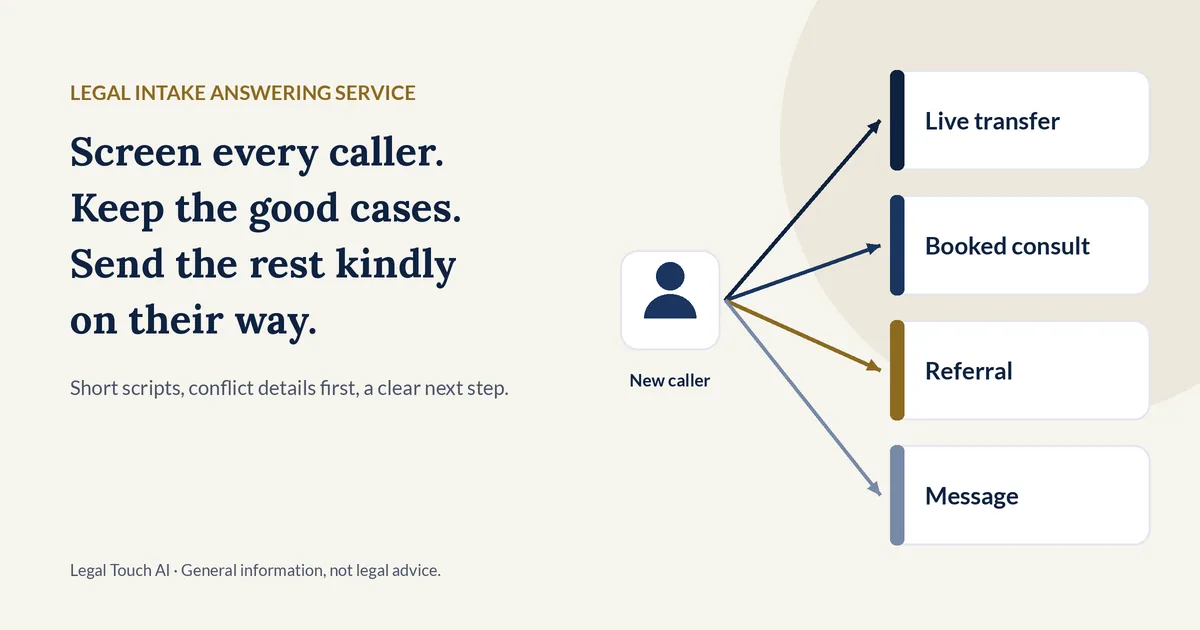
A legal intake answering service is an outside service that answers a law firm's calls, asks the firm's own screening questions, and sends each new caller to the right next step: a live transfer, a booked consultation, a referral, or a message. This guide shows how to screen callers well, what the ethics rules ask of intake, and what a longer script costs, with prices we checked on Oct 30, 2026.
Why it matters: in a secret-shopper study in Clio's 2019 Legal Trends Report, 39% of calls to law firms went to voicemail, and 79% of surveyed consumers said they expected a response within 24 hours (Clio press release, Oct 21, 2019). Screening only helps if someone answers. Good screening then makes sure the right callers reach a lawyer fast.
What is a legal intake answering service?
A legal intake answering service answers your firm's phones and runs your intake script on new callers. It gathers contact details, the type of matter, location, and urgency, then transfers the caller, books a consultation, refers them elsewhere, or takes a message. It follows your rules. Your attorneys still decide who the firm represents.
A plain answering service takes messages. An intake service screens. The difference shows up in what you get after the call:
- Message only: name, number, and "please call back."
- Intake: answers to your screening questions, an outcome, and a reason, such as "Not a fit: practice area."
- Routing: urgent or high-fit callers reach a person right away instead of waiting for a callback.
Intake can be done by live receptionists, by an AI receptionist, or by a mix. Our comparison of legal answering services and AI receptionists covers the main providers.
What questions should a legal intake call ask?
A legal intake call should ask only what the firm needs to choose the next step. That usually means the caller's name and contact details, whether they are a current client, the type of matter, the state and county, the names of others involved, any deadline or court date, and whether another lawyer is already involved.
Here is a short core set most small firms can start from. Add practice-area questions only if they change who you call back first.
| Question | Why the firm needs it | Used for |
|---|---|---|
| Full name, spelled out | Records and conflict search | Conflicts |
| Best phone number and email | Callback and booking confirmation | Contact |
| Current client or new matter? | Current clients go to their team, not intake | Routing |
| What is it about, in a sentence or two? | Matches the call to a practice area | Fit |
| Which state and county? | Shows whether the firm handles matters there | Fit |
| Names of other people or companies involved | Lets the firm run its conflict check | Conflicts |
| Any court date, deadline, or arrest? | Flags calls that cannot wait | Urgency |
| Is another lawyer already involved? | Tells the attorney what to cover first | Fit |
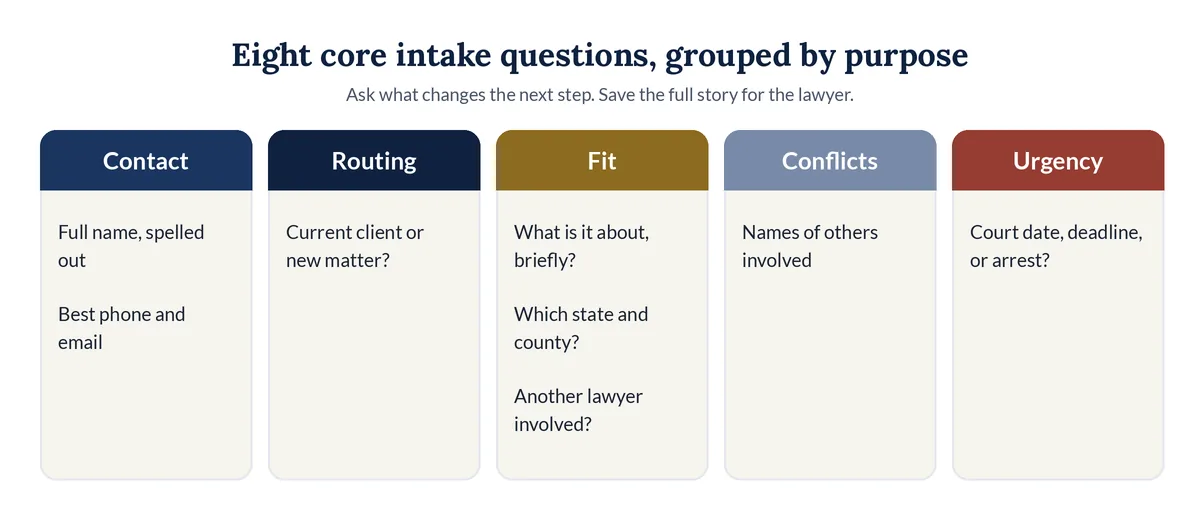
Notice what is missing: the full story. Detailed facts can wait until the firm has cleared conflicts and decided it may take the matter.
How do you screen callers without losing good cases?
To screen callers without losing good cases, write down what a good case looks like, collect conflict details first, ask a few plain questions, and route every caller to a clear next step. Then review calls every week. Speed matters too: in Clio's study, 79% of consumers expected a reply within 24 hours.
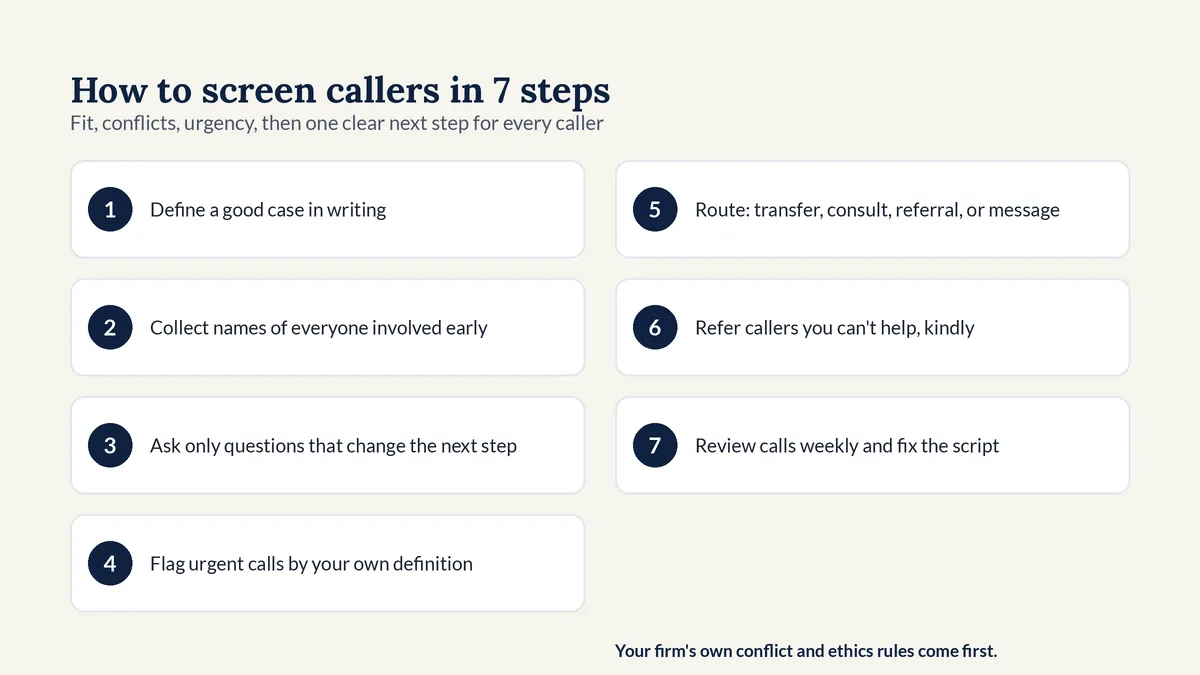
- Define a good case in writing: your practice areas, the counties you serve, and the facts that make a matter a fit.
- Collect the caller's name and the names of others involved early, before any detailed story.
- Ask only the questions that change the next step, in plain words, one at a time.
- Flag urgent calls using your own definition, such as an arrest or a court date tomorrow.
- Route each caller to one outcome: live transfer, booked consultation, referral, or message.
- Refer callers you can't help kindly, with a referral number your firm approves.
- Review recordings and summaries every week, and fix the script when a good case slipped through or a poor fit got booked.
Two habits protect good cases most. First, never let a high-fit caller hang up with only "someone will call you." Transfer them, or book a time while they are on the line. Second, treat "Not a fit" as a reason code, not a dead end, so you can spot screening rules that turn away work you want.
What does ABA Model Rule 1.18 mean for intake calls?
ABA Model Rule 1.18 says a person who consults a lawyer about possibly hiring them is a prospective client. Even if the firm never takes the case, it generally may not use or reveal what that person shared. Comment [4] advises limiting the first consultation to information that reasonably appears necessary to decide whether to take the matter.
That is the ethics reason for short intake. Under paragraph (c), if a lawyer receives information that "could be significantly harmful" to the prospective client, the lawyer, and in some cases the whole firm, may be barred from representing someone with materially adverse interests in the same or a substantially related matter (Rule 1.18). ABA Formal Opinion 492 (June 9, 2020) adds that lawyers should warn prospective clients against disclosing detailed information (Formal Opinion 492).
Using an outside service does not move these duties off the firm:
- Supervision. Rule 5.3, comment [3], says a lawyer using a service outside the firm must make reasonable efforts to ensure it works in a way compatible with the lawyer's professional obligations (Rule 5.3 comment).
- AI tools. ABA Formal Opinion 512 (July 29, 2024) says lawyers using generative AI must consider their duties of competence, confidentiality, communication, and reasonable fees (ABA news release).
- Your state controls. The Model Rules are a template. Your state's version, its ethics opinions, and your firm's own conflict-check and ethics procedures govern how your intake must work.
This is general information, not legal advice. Have the attorney responsible for your firm's ethics compliance approve your script before any service uses it.
Can an answering service run conflict checks?
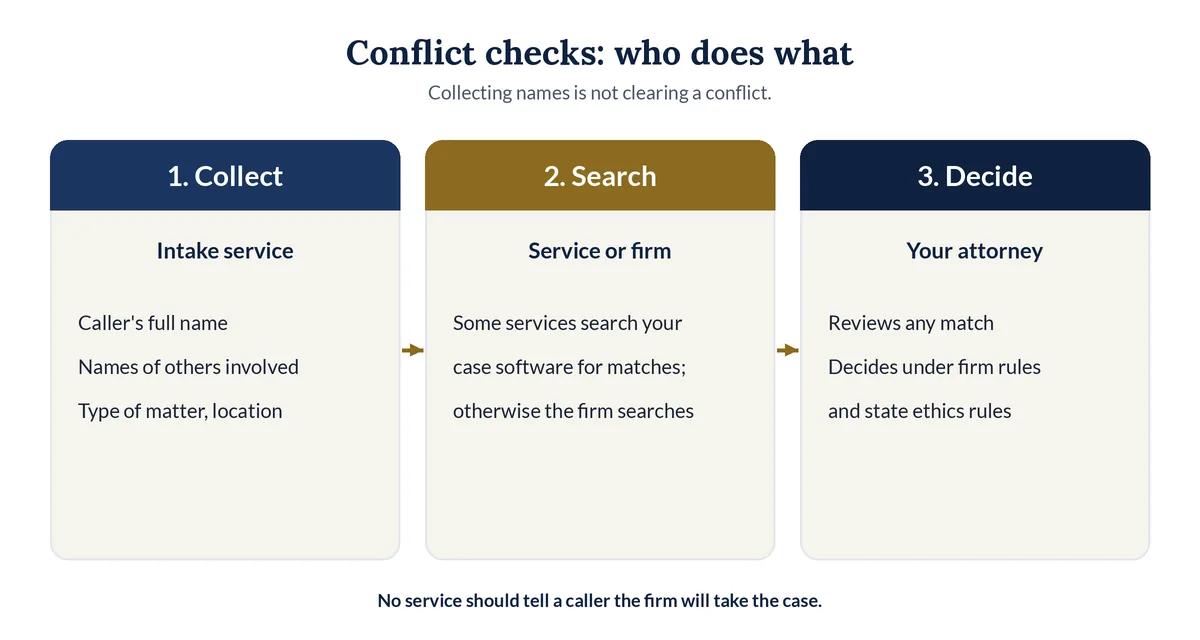
An answering service can collect the names your conflict check needs, and some services can search your case software for matches. None should decide whether a conflict exists. That is a legal judgment for your attorneys, made under your firm's procedures and your state's rules, after the service hands over the names.
What each provider says about intake and conflicts on its own pages:
| Provider | Who answers | Intake, per its own page | Conflict checks, per its own page |
|---|---|---|---|
| Smith.ai live | People | Qualification and 5 intake questions included; Extended Intake (6 more) $1.50 a call | $0.50 a call; checks new leads in your CRM |
| Intake Gateway | AI, 4 practice areas | Intake for personal injury, workers' comp, criminal defense, family law | Optional check against Clio during the call; flags matches, never declines anyone |
| ClaireAI | AI | Firm-configured legal intake on every plan | Basic pre-screening on every plan, real time from Growth; "not a complete conflicts analysis" |
| Answering Legal | People, law firms only | Custom intake for every new client caller | Not stated on its intake page |
| LEX Reception | People, law firms only | Screening, qualification, scheduling, follow-up | Not stated on its plans page |
| Alert Communications | People, law firms only | Intake from Tier 2 ($590 for 250 minutes) | Not stated on its plans page |
| Ruby | People | Client intake listed as an optional feature | Not stated on its pricing page |
| Legal Touch AI | AI, set up and run for you | Your screening questions, one at a time | Never decides conflicts; passes the details to you |
Checked Oct 30, 2026. "Not stated" means we did not find it on that page, not that the service can't do it. Ask each provider directly.
How much does a legal intake answering service cost?
A legal intake answering service costs from $105 to $720 a month at 60 three-minute intake calls, based on published prices we checked on Oct 30, 2026. AI and per-call plans sit at the low end. Live per-minute services cost more, and their bills grow when your intake script gets longer.
We priced 60 new-client calls a month two ways: a short script (3 minutes a call, 180 minutes) and a longer one (6 minutes a call, 360 minutes).
| Service | Who answers | 3-minute script | 6-minute script | Change |
|---|---|---|---|---|
| Smith.ai AI Receptionist | AI | $105 | $105 | None |
| ClaireAI Solo | AI | $129 | $129 | None |
| Intake Gateway | AI, 4 practice areas | $149 | $149 | None |
| Abby Connect, AI | AI | $329 | $599 | +82% |
| PATLive | People | $349 | $592 | +70% |
| LEX Reception | People, law firms only | $450 | $585 | +30% |
| Alert Communications, Tier 2 | People, law firms only | $590 | Not published | Overage not shown |
| Abby Connect, human | People | $599 | $1,380 | +130% |
| Smith.ai live receptionists | People | $645 | $735 | +14% |
| Ruby | People | $720 | $1,725 | +140% |
Method: cheapest published plan, plus published overage where it was cheaper. Where overage isn't published (Ruby, Abby Connect, Alert), we moved up a plan instead of guessing. Smith.ai live bills per call, so for the longer script we added its Extended Intake add-on ($1.50 a call). Taxes and other add-ons are excluded.
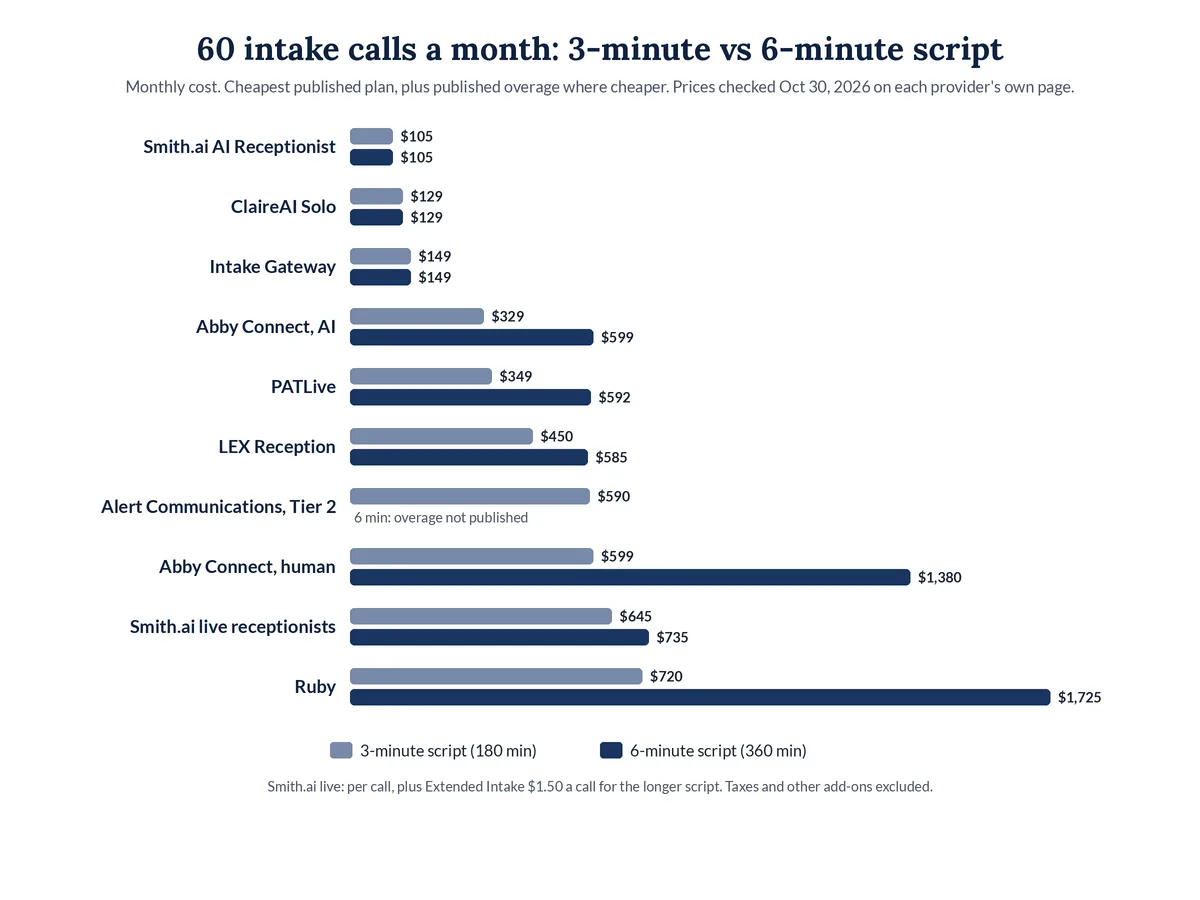
The lesson matches the ethics advice: a shorter script protects the firm and, on per-minute plans, costs less. For costs at 30 and 120 calls, see our legal answering service cost breakdown.
Is AI legal intake as good as a live intake specialist?
AI legal intake is good at asking the same questions every time, answering at any hour, and booking consultations without hold time. A live intake specialist is better with callers in crisis, unclear stories, and judgment calls. Many firms use AI for nights and overflow, and people for the hardest calls.
Choose by the calls you actually get:
- Mostly routine first calls. AI handles consistent screening and booking well, at a steady price.
- Many callers in distress. A person on every call may suit you better, for example Answering Legal, LEX Reception, PATLive, or Ruby.
- A mix. Abby Connect and Smith.ai sell AI and live answering under one provider.
- Lowest price, built yourself. Smith.ai's AI plans, ClaireAI, and Intake Gateway cost less than ours if you write and tune the script.
Whatever you pick, test it with real scenarios before launch: a caller who wants advice, a caller with a court date tomorrow, and a caller you don't serve.
How does Legal Touch AI handle intake?
Legal Touch AI answers on the first ring, says it is your firm's AI assistant, gives a recording notice, and asks your screening questions one at a time. Good callers reach you live during office hours with a text first. After hours, it books the consultation on your Google or Outlook calendar.
What happens on each type of call, per our how it works page:
- Callers you don't serve are told politely, can get a referral number you give us, and show in your summary marked "Not a fit."
- Urgent calls, by your definition, get an "URGENT" text and email, and it can ring your cell.
- Missed transfers go back to the caller to book a time, and you get a "missed transfer" text.
- Every call ends with a summary in about a minute, plus the recording and transcript.
It never gives legal advice, never decides conflicts, never promises your firm will take a case, and never quotes fees unless you approve the exact wording. If your conflict procedure needs the other party's name, that is one of the questions you choose.
Legal Touch AI starts at $149 a month if you set it up yourself, month to month, with a 60-day money-back guarantee (minus costs, max $750); see Legal Touch AI plans and pricing, and our guide to AI receptionists for law firms for the full call flow. If you are comparing it with one provider in particular, read our honest Smith.ai alternative comparison.
Why we wrote this guide
The Legal Touch AI team has run Legal Touch since 2021. We set up Legal Touch AI on our own phone lines first, screening callers and booking callbacks, before offering it to small law firms. We wrote this guide because the hardest part of intake is not the software. It is deciding which questions to ask, and which to save for the lawyer.
Hear a screening call. Book a 15-minute Legal Touch AI demo and ask it the questions your callers ask.
Related guides
Frequently asked questions
What is the difference between an answering service and an intake service?
An answering service mainly takes messages and passes them on. An intake service asks your screening questions, records the answers, and sends each caller to a next step, such as a live transfer, a booked consultation, or a referral. Many legal answering services now offer both, often at different prices or plan levels.
Can a legal intake answering service give legal advice?
No. An intake service collects facts and routes the call. It should not give legal advice, predict how a case will turn out, decide conflicts, or promise that the firm will take a matter. Those decisions belong to your attorneys. Script a polite reply for callers who ask, such as offering a consultation.
How long should a legal intake call take?
Long enough to choose the next step, and no longer. ABA Model Rule 1.18 comment [4] advises limiting a first consultation to what reasonably appears necessary. Smith.ai's live plans require Extended Intake questions to average 120 seconds or less. Time your own script on test calls before launch, then trim questions that don't change the outcome.
What should an intake service do with callers the firm can't help?
It should tell them kindly that the firm can't help with that matter, offer a referral number the firm approves, and log the call with a reason, such as "Not a fit: practice area." Logging matters. Weekly reviews of those calls show whether your screening rules turn away cases you want.
Who sees the information a caller gives during intake?
It depends on the provider, so ask before you sign. With Legal Touch AI, your firm gets every summary, recording, and transcript by text, email, and in your dashboard, and the call records belong to your firm. Retention, export, and deletion terms are set in the service agreement.
Legal Touch AI is not a law firm and does not provide legal advice. This article is general information. Using Legal Touch AI does not create an attorney-client relationship.
Sources (checked Oct 30, 2026)
- Clio, Legal Trends Report press release (Oct 21, 2019): https://www.clio.com/about/press/clios-legal-trends-report-reveals-law-firms-struggle-to-respond-to-client-inquiries/
- ABA Model Rule 1.18, Duties to Prospective Client: https://www.americanbar.org/groups/professional_responsibility/publications/model_rules_of_professional_conduct/rule_1_18_duties_of_prospective_client/
- ABA Model Rule 1.18, Comment: https://www.americanbar.org/groups/professional_responsibility/publications/model_rules_of_professional_conduct/rule_1_18_duties_of_prospective_client/comment_on_rule_1_18_duties_of_prospective_client/
- ABA Model Rule 5.3, Comment: https://www.americanbar.org/groups/professional_responsibility/publications/model_rules_of_professional_conduct/rule_5_3_responsibilities_regarding_nonlawyer_assistant/comment_on_rule_5_3/
- ABA Formal Opinion 492 (June 9, 2020): https://www.americanbar.org/content/dam/aba/administrative/professional_responsibility/ethics-opinions/aba-formal-opinion-492.pdf
- ABA news release on Formal Opinion 512 (July 29, 2024): https://www.americanbar.org/news/abanews/aba-news-archives/2024/07/aba-issues-first-ethics-guidance-ai-tools/
- Smith.ai AI Receptionist pricing: https://smith.ai/pricing/ai-receptionist
- Smith.ai live receptionist pricing: https://smith.ai/pricing/receptionists
- Smith.ai reasonable use policy: https://smith.ai/receptionists/terms-reasonable-use
- ClaireAI pricing: https://theclaireai.com/pricing
- Intake Gateway pricing: https://www.intakegateway.com/pricing
- Abby Connect pricing: https://www.abby.com/pricing/
- PATLive pricing: https://www.patlive.com/pricing/
- LEX Reception plans: https://www.lexreception.com/plans-direct
- LEX Reception legal intake: https://www.lexreception.com/services/legal-intake
- Alert Communications plans: https://www.alertcommunications.com/plans/
- Answering Legal legal intake: https://www.answeringlegal.com/our-services/legal-intake
- Ruby pricing: https://www.ruby.com/pricing/
- Legal Touch AI how it works: https://legaltouchai.com/how-it-works/
- Legal Touch AI pricing: https://legaltouchai.com/pricing/