AI Receptionist Clio Integration: Getting Calls Into Clio Grow, Clio Manage and MyCase
An AI receptionist Clio integration is a connection that sends what an AI phone receptionist learns on a call, such as the caller's name, number, and reason for calling, into Clio so nobody retypes it. This guide covers Clio Grow, Clio Manage, and MyCase: where each call should land, which fields map, the connection routes, conflict checks, and setup, with sources checked Nov 2, 2026.
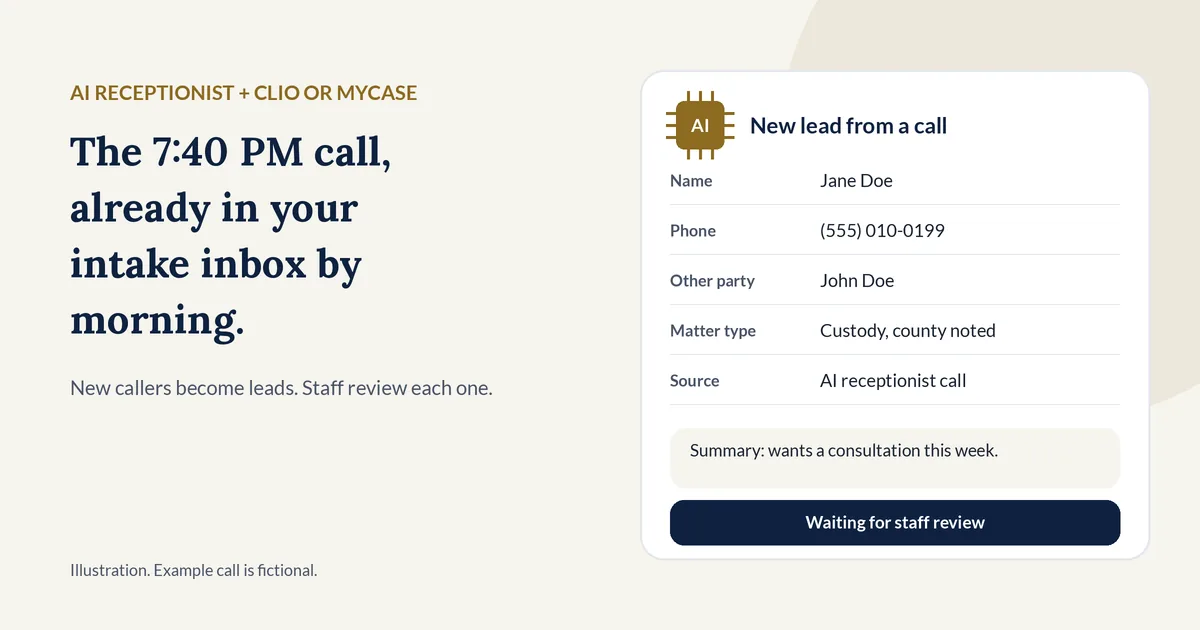
Why it matters: in a secret-shopper study in Clio's 2019 Legal Trends Report, 39% of calls to law firms went to voicemail (Clio press release, Oct 21, 2019). An AI receptionist fixes the answering. The integration fixes the next step, so a Saturday caller is already in your intake inbox on Monday morning instead of on a sticky note. For why calls get missed in the first place, see our guide to why law firms miss calls and what it costs.
What is an AI receptionist Clio integration?
An AI receptionist Clio integration is a connection that sends each call's details, such as the caller's name, phone, email, and a short summary, from the AI receptionist into Clio. New callers usually become leads in Clio Grow, and calls from current clients can be logged in Clio Manage. A MyCase integration does the same job for MyCase.
Three products come up in every setup:
- Clio Grow is Clio's client intake and legal CRM software. Clio describes it as software that "captures and qualifies leads, runs conflict checks, automates intake workflows, and converts prospects into clients" (Clio Grow).
- Clio Manage is Clio's practice management product, which Clio says helps firms "centralize matters, clients, & finances."
- MyCase is practice management software from 8am. Its Leads feature lets a firm add and track leads, and converting a lead adds a new case and contact (MyCase Leads Overview).
A good integration does four things:
- Creates a lead for each new caller, with the call summary attached.
- Logs the call for a current client on the right matter or case.
- Labels the source, so you can see how many leads came from the phone.
- Leaves out junk, such as spam, sales calls, and hang-ups.
For how the AI answers and screens the call itself, see our complete guide to AI receptionists for small law firms.
Should calls go to Clio Grow or Clio Manage?
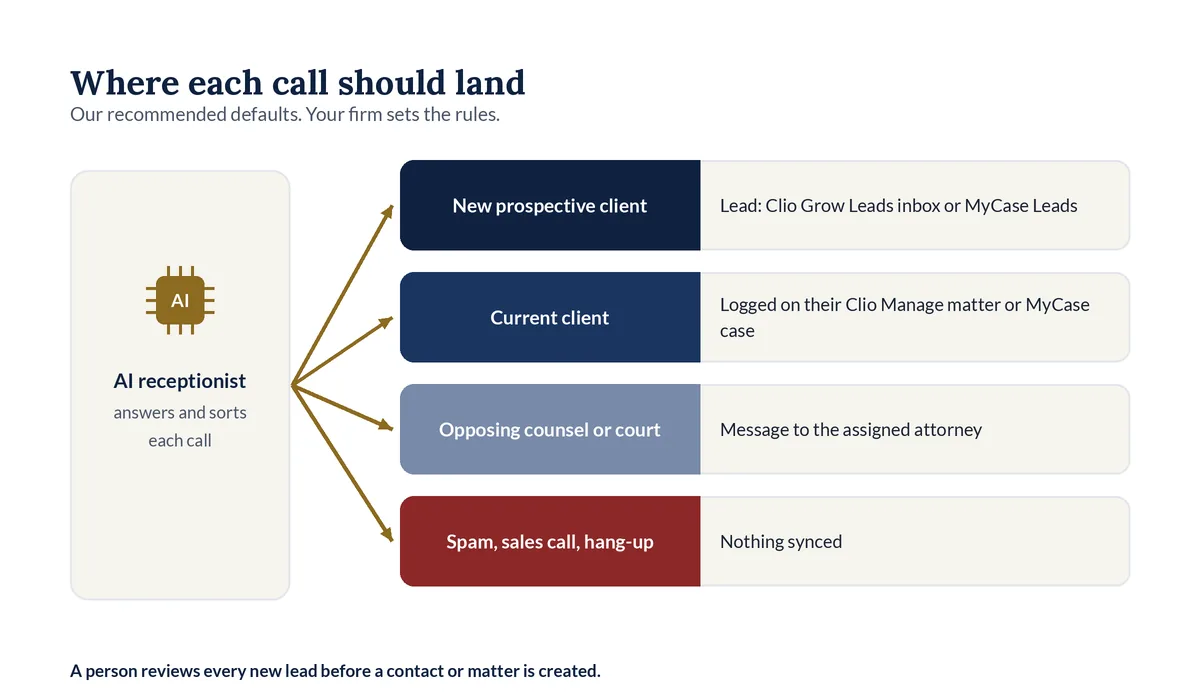
Send new prospective clients to Clio Grow and calls from current clients to Clio Manage. Clio Grow's Leads inbox is built for review: staff add a lead as a contact, use Quick Intake to create a contact and a matter, or ignore it. Current clients already have a matter in Clio Manage, so their calls belong there.
Where each call should land (our recommended defaults)
| Who is calling | In Clio | In MyCase |
|---|---|---|
| New prospective client | A lead in the Clio Grow Leads inbox | A lead in Leads |
| Current client | A communication or note on their matter in Clio Manage | A Call Log entry linked to their case |
| Opposing counsel or court staff | A message to the assigned attorney; log it on the matter if your firm wants | A Call Log entry for the assigned attorney |
| Vendor or other non-client | A message only | A message only |
| Spam, sales call, or hang-up | Nothing synced | Nothing synced |
Clio's help center says marketing leads can come from third-party integrations, from your website through the Grow API endpoint, or from your Clio Website, and they wait in the Leads tab "for review and action" (Clio Help, Manage Leads in Clio Grow). That review step is useful: a person looks at each caller before a contact or matter exists.
How does an AI receptionist send leads to Clio Grow?
An AI receptionist sends a lead to Clio Grow by posting it to Clio's Lead Inbox endpoint with your firm's lead capture token, or through the newer Clio Platform API with your OAuth permission. Either way, the caller's name, a message, and a source are required, and the lead lands in the Clio Grow Leads inbox for review.
To find the token, Clio's help center says to go to Settings > Integrations, scroll down to Lead capture, and click Copy under Lead capture token. You paste that token into the receptionist's settings, or your vendor does it with you on a setup call.
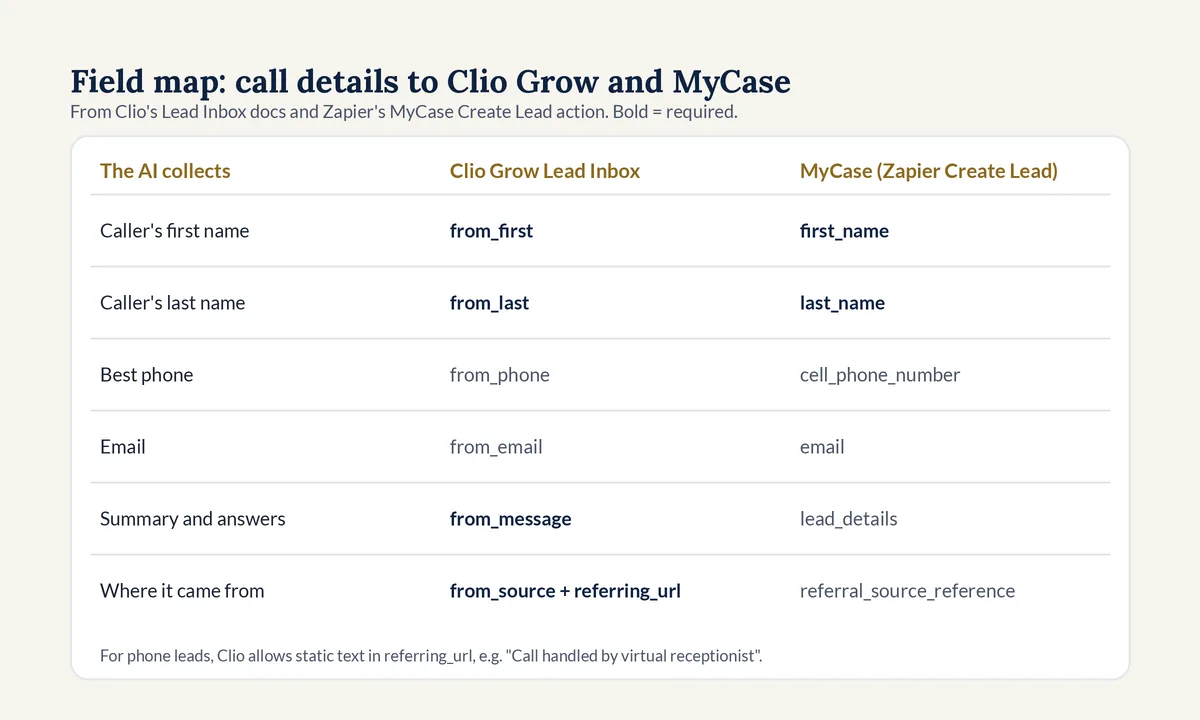
Field map: what the AI collects and where it goes (compiled from Clio and Zapier documentation)
| What the AI collects | Clio Grow Lead Inbox field | MyCase field (Zapier Create Lead) |
|---|---|---|
| Caller's first name | from_first (required) |
first_name (required) |
| Caller's last name | from_last (required) |
last_name (required) |
| Best phone number | from_phone (optional) |
cell_phone_number (optional) |
from_email (optional) |
email (optional) |
|
| Call summary and intake answers | from_message (required) |
lead_details (optional) |
| Where the lead came from | from_source and referring_url (both required) |
referral_source_reference (optional) |
Sources: Clio Developer Documentation, Lead Inbox API Endpoint, and Zapier's MyCase integration page, both checked Nov 2, 2026.
Details worth knowing before you connect:
- The token route is labeled legacy. Clio's developer docs call the Lead Inbox endpoint a "Legacy Approach" and point new builds to the Clio Platform API (Clio Developer Docs, Lead Inbox API).
- Phone leads have a set source line. The
referring_urlfield is meant for a web page, but Clio says static text such as "Call handled by virtual receptionist" can be sent when a lead did not come from a web form. - Errors are specific. A wrong token returns a 401 response, and a missing required field returns a 422 error that names the field.
- Permissions changed recently. On Oct. 21, 2026, Clio began enforcing its inbox lead read permissions, so an app now reads only the leads it submitted unless it asks for wider access (Clio Grow API changelog). Ask any vendor whether its Clio connection was updated.
Extra intake answers, such as matter type or county, go inside the message field. Put the other party's name on the first line, so whoever reviews the lead sees it right away.
How does an AI receptionist connect to MyCase?
An AI receptionist connects to MyCase through a built-in connection its vendor maintains, through Zapier, or through MyCase's Open API. Zapier's MyCase app has a Create Lead action that needs only a first and last name, plus a Create Call action for the Call Log. The Open API is only on MyCase's Advanced tier.
What each MyCase feature does with a call:
- Leads. A lead moves through statuses such as New, Contacted, Consult Scheduled, and Pending. When converted, a new case and contact are added.
- Online Leads. Submissions from MyCase's online lead forms land under Leads > Online Leads, where firm users approve or delete them (MyCase Help, Online Lead Forms).
- Call Log. A call record holds the caller's name, phone number, the case or potential case, who the call was for, a message, and whether it is resolved (MyCase Help, Call Log Overview).
MyCase also asks firms that use the Open API to have a technical team that can work without MyCase's help. Plan details matter here. MyCase's pricing page lists Client Intake Forms and Legal CRM, the Call Log, and 70+ integrations on its Pro plan, and the Open API and Conflict Check Tracking on Advanced (MyCase pricing, checked Nov 2, 2026). MyCase's help center says Zapier integrations must be set up by an admin user at the firm, and that MyCase does not provide technical support for API implementations (MyCase Help, Open API).
Whatever the route, the intake script decides what the record will hold. Our guide to screening intake callers without losing good cases covers which questions to ask before anything syncs.
Native app, Zapier, or API: which connection route is best?
The best route is the one your vendor maintains and you can test. A built-in connection that uses Clio Grow's lead capture token is the simplest for new leads. Zapier suits firms that want to see and edit the field mapping. A direct API build gives the most control, but it needs developer upkeep and, on MyCase, the Advanced tier.
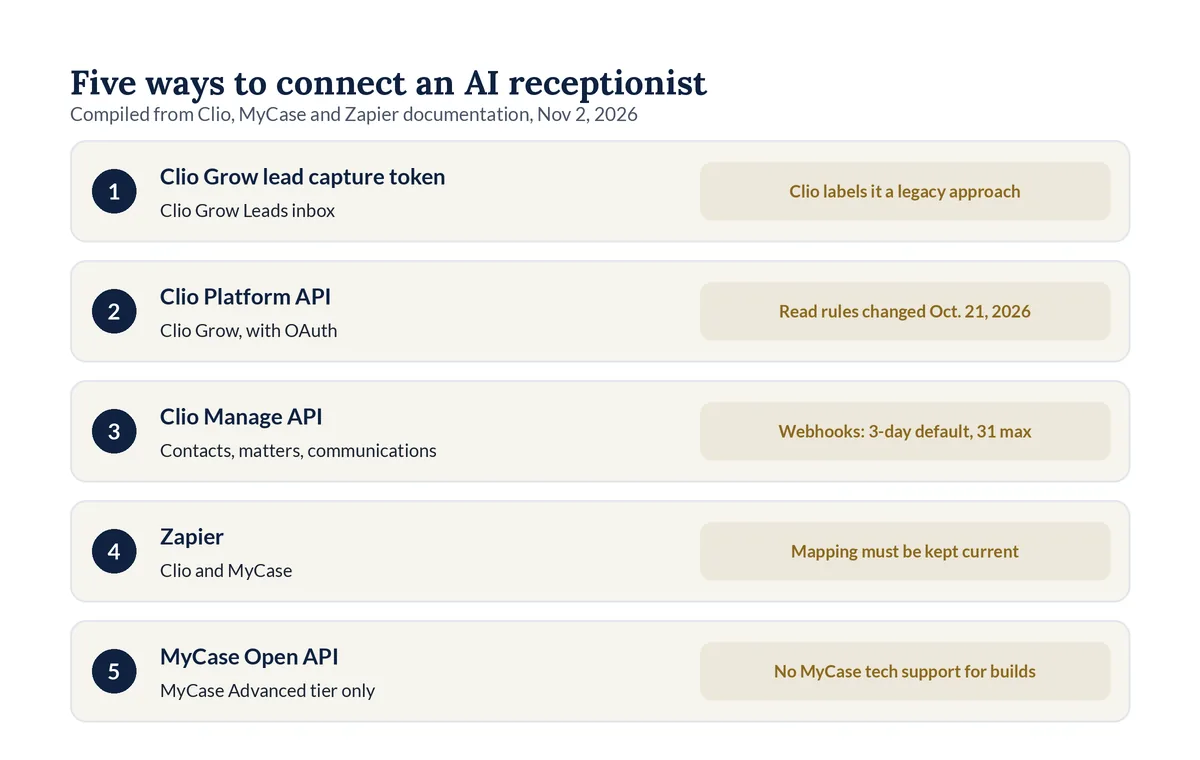
Connection routes compared (compiled from Clio, MyCase and Zapier documentation, Nov 2, 2026)
| Route | Works with | What you need | Watch for |
|---|---|---|---|
| Clio Grow lead capture token | Clio Grow Leads inbox | The token from Settings > Integrations > Lead capture | Clio labels this endpoint a legacy approach; it creates leads only |
| Clio Platform API | Clio Grow | A developer app and the firm's OAuth permission | Inbox lead read permissions changed on Oct. 21, 2026 |
| Clio Manage API | Clio Manage contacts, matters, and communications | A developer app and the firm's OAuth permission | Webhooks expire after 3 days unless a date is set, and 31 days at most |
| Zapier | Clio and MyCase | A Zapier account; for MyCase, an admin user to connect it | Each step is a field mapping your firm or vendor must keep current |
| MyCase Open API | MyCase | The Advanced tier and credentials from MyCase support | MyCase does not give technical support for API builds |
A webhook is a message one app sends to another the moment something changes. Clio Manage webhooks report changes inside Clio, such as a new matter, and must use an https address (Clio Developer Docs, Webhooks). They help with follow-up automations, not with getting a call into Clio in the first place.
Zapier's Clio app can create person contacts, matters, communications, and calendar entries, and it has a Find or Create Person Contact action (Zapier, Clio integrations). Zapier's MyCase app has Create Lead, Create Call, and Find or Create Person (Zapier, MyCase integrations).
Can an AI receptionist run a conflict check in Clio or MyCase?
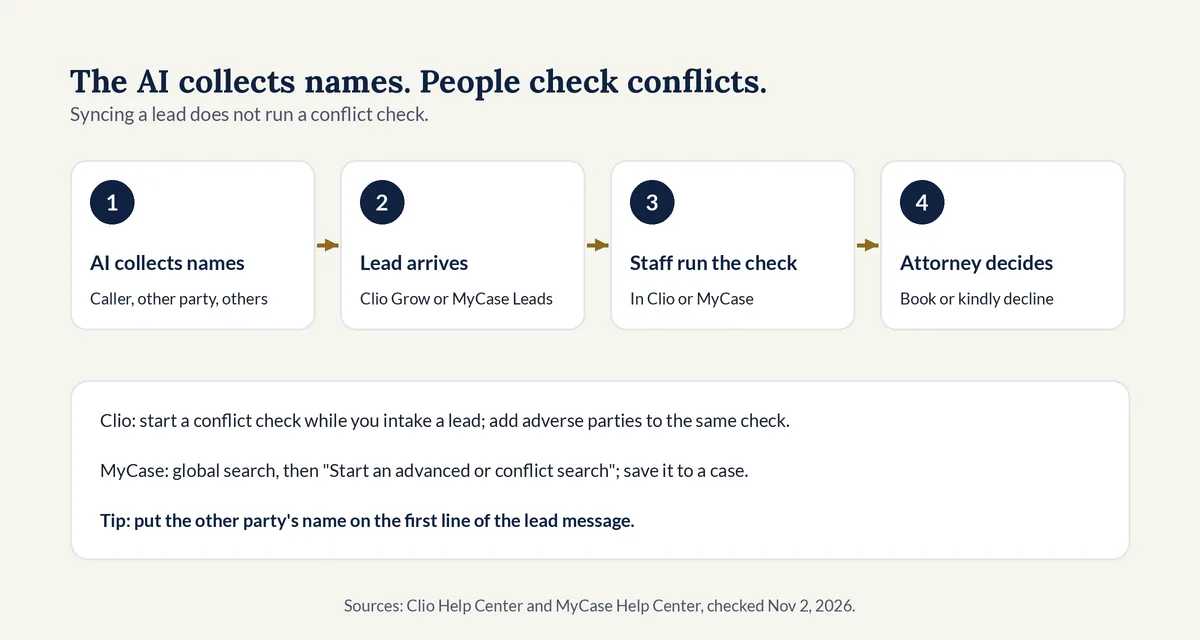
No. An AI receptionist can collect the names a conflict check needs and send them with the lead, but the check happens in Clio or MyCase, run by your staff. Clio Grow lets staff start a conflict check while they intake a lead. In MyCase, staff run a conflict search from the global search bar. An attorney decides.
A conflict check is a search of a firm's current and past contacts and matters to see whether a new person's matter would clash with duties the firm already owes. Here is how each product handles it:
- Clio. Clio says a conflict check "searches the names, contact details, and other identifying information you provide," and suggests adding adverse parties to the same check. Checks sync between Clio Manage and Clio Grow, and the feature is available on select plans (Clio Help, Run Conflict Checks).
- MyCase. Staff type a name into the global search bar and choose "Start an advanced or conflict search," then save the results to a case or export them as a PDF (MyCase Help, Conflict Checking).
The integration's job is to make that search fast: the caller's name, the other party's name, and anyone else involved, at the top of the lead. Our guide to names-first intake for family law firms shows a question order that collects names before any facts.
What should sync from a call, and what should stay out?
Sync what the firm needs to call back and check conflicts: names, phone, email, matter type, county, urgency, the other party's name, and a short summary. Keep out Social Security, account, and card numbers, and long stories. ABA Model Rule 1.18 protects information from prospective clients even if the firm never takes the case.
This is general information, not legal advice. State rules control. Points to settle before go-live:
- Limit what the first call collects. Comment [4] to ABA Model Rule 1.18 says a lawyer should limit the initial consultation to information reasonably necessary to decide whether to take the matter.
- Vet the vendor. ABA Formal Opinion 512 (July 29, 2024) lists reference checks, security policies, confidentiality agreements, and whether a tool keeps data after you stop using it.
- Grant the narrowest access. Clio's developer docs tell app builders to choose "the smallest set necessary for your application to function properly" (Clio Developer Docs, Permissions). Ask what your vendor's connection can read, not only what it writes.
- Check AI disclosure rules. Clio's own voice agent guide tells firms to "check the rules that apply in your jurisdiction regarding the disclosure of AI use to prospective clients."
- Decide where recordings live. A short summary in the lead may be enough, with the full recording and transcript kept in the receptionist's system for the people who need them.
For disclosure, recording consent, and confidentiality in more depth, see our guide to AI receptionist ethics, disclosure and recording rules.
How do you set up an AI receptionist with Clio or MyCase?
To connect an AI receptionist to Clio or MyCase, decide where each type of call lands, map every intake answer to a field, choose a connection route, connect it with an admin account, filter out junk calls, place test calls, and read each test record before you forward your firm's phone line.
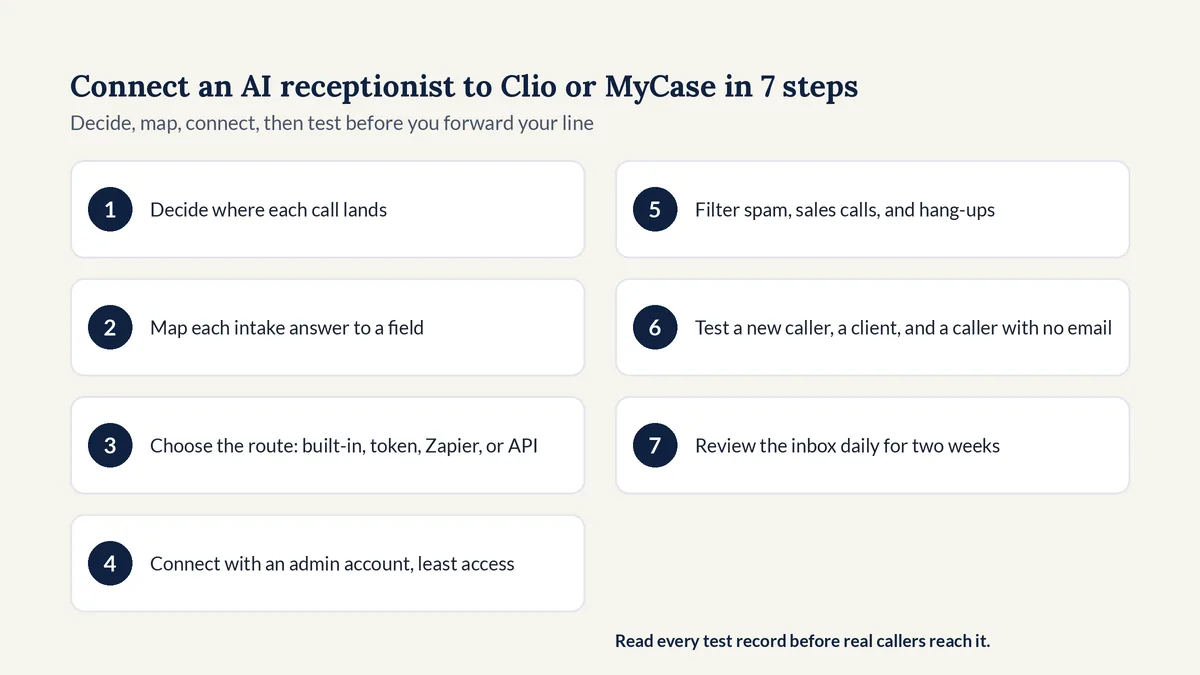
- Decide where each call lands: new callers to Clio Grow or MyCase Leads, current clients to their matter or case.
- Map each intake answer to a field, with the other party's name on the first line of the message.
- Choose the route: a built-in connection, a Clio Grow lead capture token, Zapier, or an API build.
- Connect it with an admin account and grant only the access the connection needs.
- Filter spam, sales calls, and hang-ups so they never arrive as leads.
- Test a new caller, a current client, and a caller with no email, then read each record in Clio or MyCase.
- Review the leads inbox daily for the first two weeks and fix any answer that lands in the wrong field.
Does Legal Touch AI integrate with Clio or MyCase?
Legal Touch AI sets up case software sync on request, and it is quoted separately, so ask on the demo call whether your system and the fields you want are covered. Every call already ends with a summary, the recording, and the transcript sent to you, and calls you mark as urgent get an "URGENT" text and email.
What it does on every call:
- Tells callers it is an AI in its first sentence and gives a recording notice.
- Asks your screening questions one at a time, so the answers your case software needs can be part of the script.
- Sends good callers to you live during office hours, with a text to you first.
- Books consultations on your Google or Outlook calendar after hours or when you don't pick up.
- Takes a message and flags the call when it isn't sure, instead of guessing.
It never gives legal advice, decides conflicts, or asks for Social Security numbers, card numbers, or passwords. You keep your number, and nothing goes live without your OK. See how Legal Touch AI answers a call for a full example, and Legal Touch AI plans and pricing for plans.
Why we wrote this guide
The Legal Touch AI team has run Legal Touch since 2021. We set up Legal Touch AI on our own phone lines first, screening callers and booking callbacks, before offering it to small law firms, and we know how much intake time goes into retyping call notes. On Nov 2, 2026 we read 14 page-one pages about AI receptionist and answering service connections to Clio and MyCase. Six named a connection route such as Zapier, a webhook, or an API, and three mentioned conflict checks. Only two stated a plan requirement for the case software, only one told readers to place a test call, and none mentioned Clio's Oct. 21, 2026 permission change or cited an ABA rule. This guide fills those gaps.
What 14 page-one pages covered (our review, Nov 2, 2026)
| Topic | Pages that covered it (of 14) |
|---|---|
| Named a connection route (Zapier, webhook, or API) | 6 |
| Mentioned conflict checks | 3 |
| Said the firm, not the software, runs the conflict check | 2 |
| Stated a plan or tier requirement for Clio or MyCase | 2 |
| Mentioned duplicate records | 2 |
| Told readers to place a test call | 1 |
| Mentioned reauthorizing or renewing the connection | 1 |
| Mentioned keeping sensitive data out of the sync | 1 |
| Mentioned Clio's legacy label or the Oct. 21, 2026 permission change | 0 |
| Cited an ABA Model Rule or opinion | 0 |
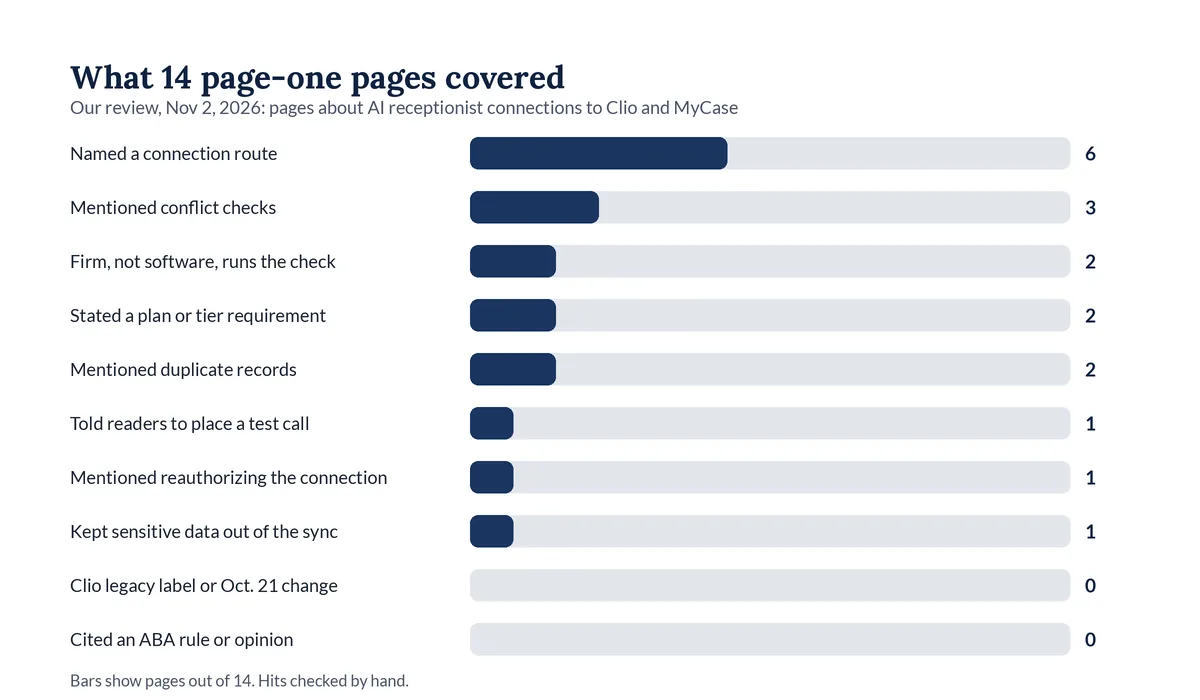
Method: we searched "ai receptionist clio integration," "mycase answering service," and four related queries, picked 17 pages from the results that describe an AI receptionist or answering service connection to Clio or MyCase, and reviewed the 14 we could fetch (three Clio App Directory pages blocked our fetch). We counted topics with a script and checked each hit by hand. Two hits that came only from site menus and footers were removed.
See it on your own intake. Book a 15-minute Legal Touch AI demo and bring your Clio or MyCase setup and the intake questions you use now.
Frequently asked questions
Does Clio have its own AI receptionist?
Yes. Clio's help center describes Grow AI's voice agent, which answers inbound calls when your team is unavailable, gathers case details, screens callers for fit, and books consultations for qualified leads. Clio says it is available to U.S. customers. A firm already on Clio Grow can compare it with an outside AI receptionist using the same test calls.
Do I need Clio Grow to send phone leads into Clio?
For a leads inbox, yes. The lead capture token and the inbox lead endpoints feed the Clio Grow Leads tab. A firm on Clio Manage alone can still have calls create a contact, a matter, or a communication through the Clio Manage API or Zapier's Clio app. Ask your vendor which Clio product it writes to.
Which MyCase plan do I need for an answering service integration?
It depends on the route. MyCase lists its Open API only on the Advanced tier, and its pricing page lists Client Intake Forms and Legal CRM, the Call Log, and 70+ integrations on Pro. Zapier connections must be set up by a MyCase admin. Ask your vendor which route it uses, then confirm your plan with MyCase.
Will an AI receptionist integration create duplicate contacts?
It can. A Clio Grow lead waits in the Leads inbox until staff add it, and Clio offers an "Already added" option for leads someone entered by hand. Zapier's Clio and MyCase apps include find-or-create actions that look for a match before creating a person. Test with a caller who is already in your system.
Should call recordings and transcripts go into Clio or MyCase?
Decide who needs to see them first. ABA Formal Opinion 512 tells lawyers to check an AI vendor's security, confidentiality terms, and data retention. One option is a short summary in the lead, with the full recording and transcript kept in the receptionist's system. Whatever you choose, set it before go-live and test it.
Can an AI receptionist book consultations on the Clio calendar?
It can if the vendor connects to Clio's calendar, for example through Zapier's Create Calendar Entry action for Clio. Clio's own voice agent creates the appointment automatically when a qualified caller books. If your AI receptionist books on Google or Outlook instead, check how that calendar reaches Clio before you rely on it.
Legal Touch AI is not a law firm and does not provide legal advice. This article is general information about intake software setup and professional ethics rules, not legal advice. Clio, Clio Grow, Clio Manage, MyCase, and Zapier are trademarks of their owners. Using Legal Touch AI does not create an attorney-client relationship.
Sources (checked Nov 2, 2026)
- Clio Developer Documentation, Lead Inbox API Endpoint: https://docs.developers.clio.com/guides/clio-grow/lead-inbox-api/
- Clio Developer Documentation, Clio Grow API changelog (Oct 21, 2026 release): https://docs.developers.clio.com/api-docs/clio-platform/grow/api-changelog/
- Clio Developer Documentation, Permissions: https://docs.developers.clio.com/api-docs/clio-platform/permissions/
- Clio Developer Documentation, Webhooks (Clio Manage): https://docs.developers.clio.com/guides/clio-manage/webhooks/
- Clio Help Center, Manage Leads in Clio Grow: https://help.clio.com/hc/en-us/articles/9290604239003-Manage-Leads-in-Clio-Grow
- Clio Help Center, Grow AI's Voice Agent: https://help.clio.com/hc/en-us/articles/52832534769179-Grow-AI-s-Voice-Agent
- Clio Help Center, Run Conflict Checks in Clio Manage and Clio Grow: https://help.clio.com/hc/en-us/articles/41182681954331-Run-Conflict-Checks-in-Clio-Manage-and-Clio-Grow
- Clio Grow product page: https://www.clio.com/grow/
- Clio, Legal Trends Report press release (Oct 21, 2019): https://www.clio.com/about/press/clios-legal-trends-report-reveals-law-firms-struggle-to-respond-to-client-inquiries/
- MyCase Help Center, Leads Overview: https://supportcenter.mycase.com/en/articles/9370266-leads-overview
- MyCase Help Center, Online Lead Forms with Dynamic Logic: https://supportcenter.mycase.com/en/articles/9628064-online-lead-forms-with-dynamic-logic
- MyCase Help Center, Call Log Overview: https://supportcenter.mycase.com/en/articles/9370030-call-log-overview
- MyCase Help Center, Conflict Checking in MyCase: https://supportcenter.mycase.com/en/articles/9369864-conflict-checking-in-mycase
- MyCase Help Center, Open API: https://supportcenter.mycase.com/en/articles/9370198-open-api
- MyCase Help Center, Zapier Integration: https://supportcenter.mycase.com/en/articles/9370177-zapier-integration
- MyCase pricing: https://www.mycase.com/pricing/
- Zapier, MyCase integrations: https://zapier.com/apps/mycase/integrations
- Zapier, Clio integrations: https://zapier.com/apps/clio/integrations
- ABA Formal Opinion 512, Generative Artificial Intelligence Tools (July 29, 2024): https://www.americanbar.org/content/dam/aba/administrative/professional_responsibility/ethics-opinions/aba-formal-opinion-512.pdf
- ABA Model Rule 1.18, Comment: https://www.americanbar.org/groups/professional_responsibility/publications/model_rules_of_professional_conduct/rule_1_18_duties_of_prospective_client/comment_on_rule_1_18_duties_of_prospective_client/
- Legal Touch AI, how it works: https://legaltouchai.com/how-it-works/