How to Write a Law Firm Intake Script for an AI Receptionist (with Templates)
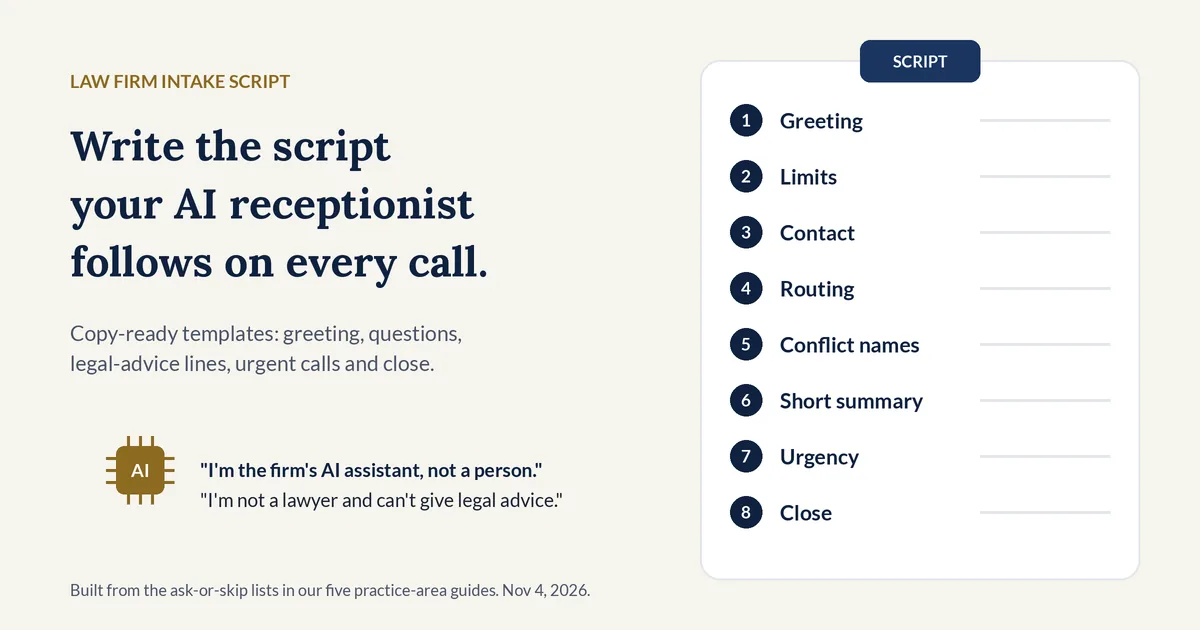
A law firm intake script is the written set of lines and questions a receptionist, live or AI, follows on a new caller's first call: the greeting, the questions to ask, the topics to skip, and what to say at each next step. This guide gives copy-ready templates built from the ask-or-skip lists in our five practice-area guides.
Why it matters: in a secret-shopper study in Clio's 2019 Legal Trends Report, 39% of calls to law firms went to voicemail, 6 out of 10 firms gave unsatisfactory phone responses, and 79% of surveyed consumers said they expected a response within 24 hours (Clio press release, Oct 21, 2019). Clio scored a call as adequate partly on whether the caller learned how to find out about cost and what happens next. A written script makes sure every call covers both.
What is a law firm intake script?
A law firm intake script is the approved wording a receptionist uses with a new caller: how to greet them, which questions to ask and in what order, what never to say, and how to end the call. For an AI receptionist, the script is also its rulebook, so anything left out is something it may improvise.
A script is not the same as an intake form. The form lists the fields you want. The script adds the spoken words, the order, and the rules for the moments a form can't plan for, such as a caller who asks for advice or says they are in danger.
Two ethics sources shape what goes in it:
- Keep the first call short. Comment [4] to ABA Model Rule 1.18 says a lawyer considering a new matter "should limit the initial consultation to only such information as reasonably appears necessary for that purpose" (ABA Model Rule 1.18, Comment).
- Say who is answering and stay with facts. Florida Bar Ethics Opinion 24-1 (Jan 19, 2024, advisory) repeats an older Florida opinion on intake by nonlawyers: they must "clearly identify their nonlawyer status," limit questions to factual information, and "refer any legal questions back to the lawyer" (Florida Bar Ethics Opinion 24-1).
What should a law firm intake script include?
A law firm intake script should include eight parts: a greeting with an AI and recording notice, a limits line, contact details, a current-client check, the names needed for a conflict check, a one or two sentence summary, urgency questions, and a close that names the next step. Practice-area questions slot in after the summary.
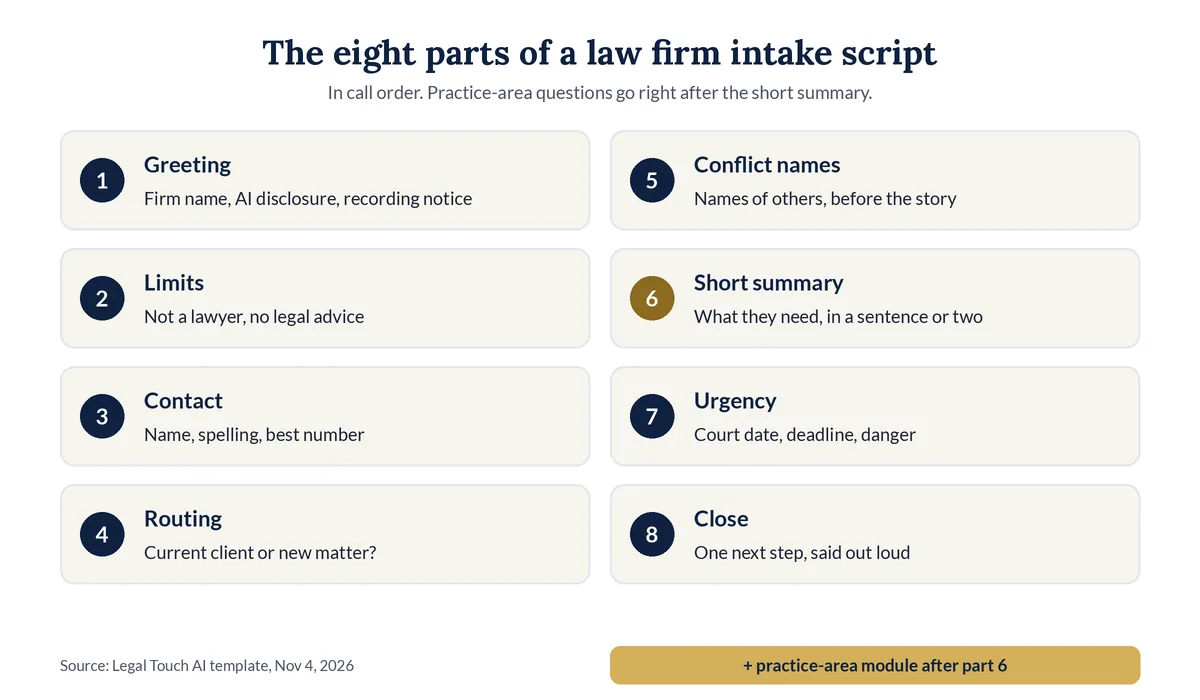
| Part | What it does | Template line |
|---|---|---|
| 1. Greeting | Names the firm, says it is AI, gives the recording notice | "Thank you for calling [Firm name]. I'm the firm's AI assistant, not a person. This call is recorded so the firm can follow up with you. Is that OK?" |
| 2. Limits | Sets expectations before facts are shared | "I'm not a lawyer and can't give legal advice. I can take a few details so an attorney can review them and get back to you." |
| 3. Contact | Gets the callback details first, in case the call drops | "What is your full name? And the best number to reach you?" |
| 4. Routing | Separates current clients from new callers | "Are you a current client of the firm, or is this a new matter?" |
| 5. Conflict names | Collects names before the story | "Who else is involved, such as another person, a business, or an insurance company? Just the names for now." |
| 6. Short summary | Matches the call to a practice area | "In a sentence or two, what do you need help with?" |
| 7. Urgency | Finds deadlines and danger | "Is there a court date, a deadline, or a letter with a date on it? Is anyone in danger right now?" |
| 8. Close | Names the next step and sets limits again | "Thank you. An attorney will review this. Talking with me today doesn't mean the firm has agreed to represent you." |
Brackets show where your own words go. Keep each line short: an AI receptionist reads them aloud, and a caller hears them once.
How do you write an AI receptionist intake script?
To write an AI receptionist intake script, list the calls you get, decide which callers you want, cut every question that doesn't change the next step, and write exact lines for the greeting, the hard questions, urgent calls, and the close. Then have a lawyer approve it, test it, and review real calls weekly.
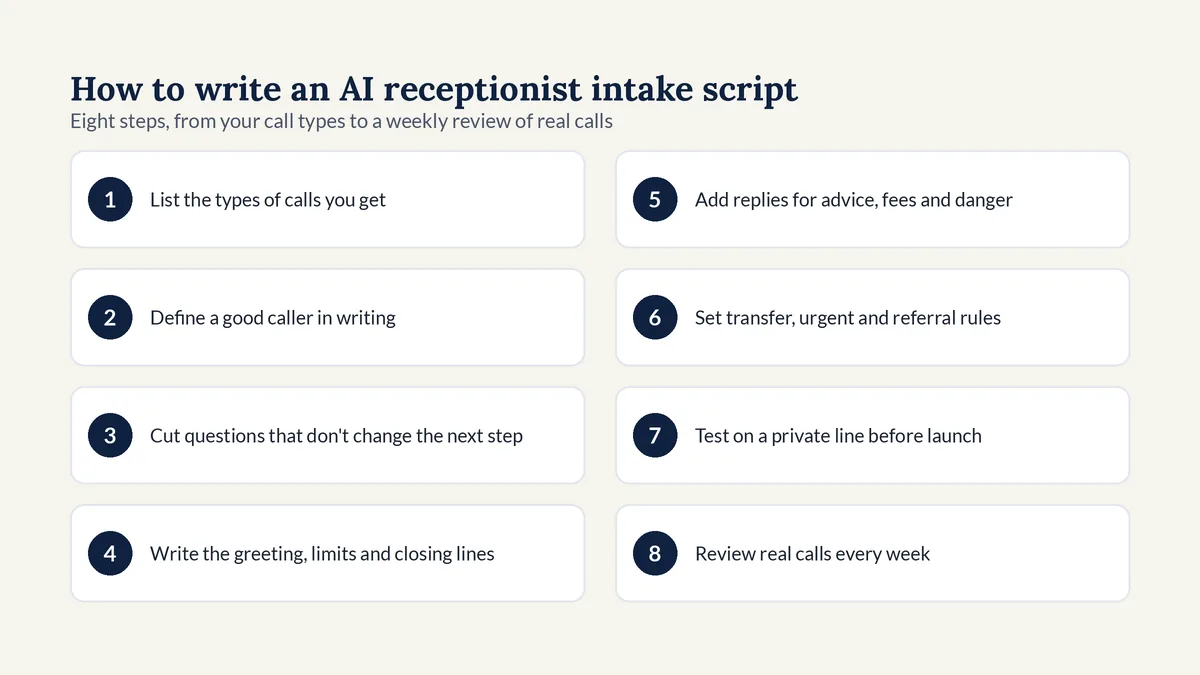
- List the types of calls you get: new matters by practice area, current clients, opposing counsel, courts, vendors, and wrong numbers.
- Define a good caller in writing: the matters you take, the counties you serve, and any facts that make a matter a fit.
- Cut every question that doesn't change who calls back, how fast, or whether the firm can take the matter.
- Write the exact greeting, limits line, and closing line, in plain words a caller understands the first time.
- Add fixed replies for legal questions, fee questions, a caller who already has a lawyer, and a caller in danger.
- Set the routing rules: who gets live transfers, what counts as urgent, and which referral number to give.
- Test the script on a private line with your hardest calls before any real caller reaches it.
- Review recordings and summaries every week, and fix the script when a good caller slipped through.
Comment [3] to ABA Model Rule 5.3 says a lawyer using an outside service "should communicate directions appropriate under the circumstances to give reasonable assurance that the nonlawyer's conduct is compatible with the professional obligations of the lawyer" (ABA Model Rule 5.3, Comment). A written script is the clearest form those directions can take. ABA Formal Opinion 512 adds that managerial lawyers "must establish clear policies regarding the law firm's permissible use of GAI" (ABA Formal Opinion 512, July 29, 2024).
What should an AI receptionist say first?
An AI receptionist should first name the firm, say it is the firm's AI assistant and not a person, give a recording notice if calls are recorded, and say it is not a lawyer and can't give legal advice. Then it should ask for the caller's name and number, before any facts about the matter.
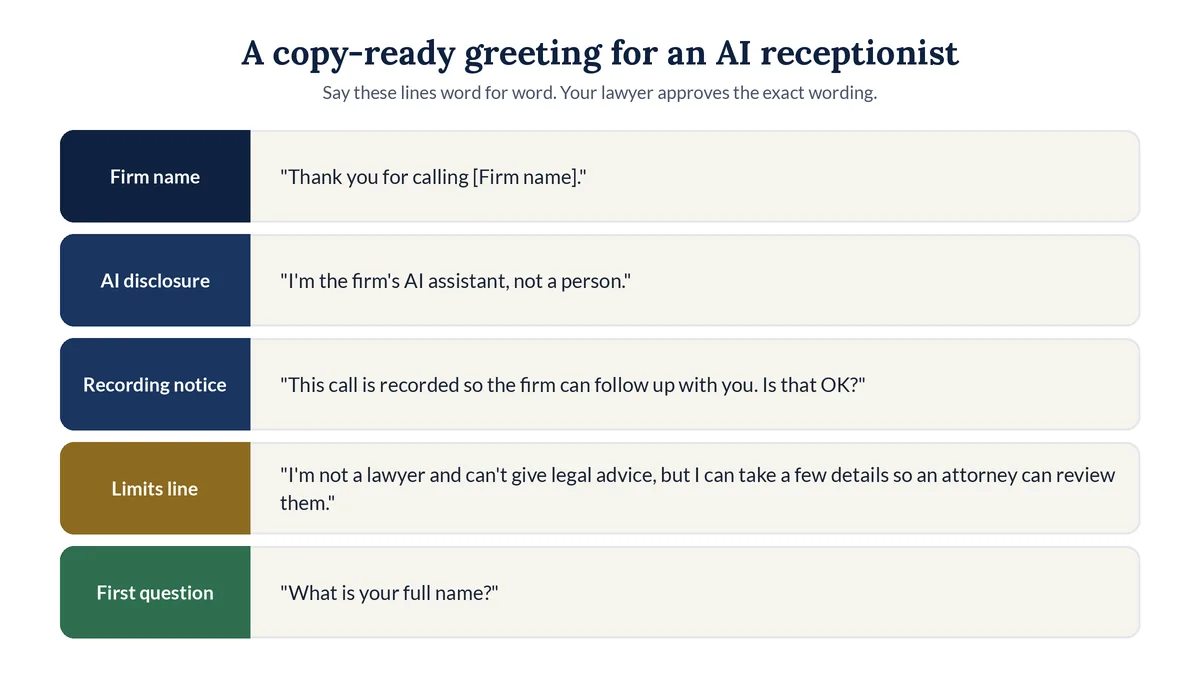
Copy-ready greeting template:
- Greeting: "Thank you for calling [Firm name]. I'm the firm's AI assistant, not a person. This call is recorded so the firm can follow up with you. Is that OK?"
- If yes: "Thank you. I'm not a lawyer and can't give legal advice, but I can take a few details so an attorney can review them. What is your full name?"
- If no to recording: follow the option you choose, such as "No problem. I can take a short message for the attorney, or give you the office number."
- If asked "Are you a real person?": "No, I'm the firm's AI assistant. I can take your details, or help you reach the office."
Why each piece is there:
- AI disclosure. Florida Bar Ethics Opinion 24-1 says generative AI chatbots that talk with clients or third parties "must include a disclaimer indicating that the chatbot is an AI program and not a lawyer or employee of the law firm." Utah Code 13-77-103 requires a person in a regulated occupation to "prominently disclose" generative AI use in high-risk interactions, and a business using it with consumers to disclose it when someone clearly asks (Utah Code 13-77-103).
- Recording notice. Some states require every party's consent to record a call. Our state-by-state guide to call recording consent shows where.
- Limits line. Comment [2] to Rule 1.18 says a consultation is likely to have occurred when a lawyer invites information "without clear and reasonably understandable warnings and cautionary statements that limit the lawyer's obligations." Your lawyer decides the exact wording.
What legal intake questions should the script ask?
The script should ask the caller's name and best phone number, whether they are a current client, the names of others involved, what they need in a sentence or two, the state and county, any court date or deadline, and whether another lawyer is involved. Add practice-area questions only if the answer changes the next step.
Core legal intake questions, in order:
| # | Ask this | Why it comes here |
|---|---|---|
| 1 | "What is your full name? Could you spell your last name?" | Records and the conflict check need the exact spelling |
| 2 | "What is the best number to reach you? Is it OK to call or text that number?" | The callback, and a safe way to reach the caller |
| 3 | "Are you a current client of the firm, or is this a new matter?" | Current clients go to their attorney, not intake |
| 4 | "Who else is involved? Just the names for now." | Names come before the story, for the conflict check |
| 5 | "In a sentence or two, what do you need help with?" | Matches the call to a practice area |
| 6 | "Which state and county is this in?" | Shows whether the firm handles matters there |
| 7 | "Is there a court date, a deadline, or a letter with a date on it?" | Flags calls that can't wait |
| 8 | "Have you talked with another lawyer about this?" | A represented caller needs different handling |
Florida's opinion also suggests screening questions that limit an AI's conversation "if a person is already represented by another lawyer." So if the answer to question 8 is yes, the script should take a message for the attorney and stop asking about the matter.
For how screening rules turn these answers into transfers, bookings, and referrals, see our guide to how a legal intake answering service screens callers.
What should an intake script tell the AI not to ask?
An intake script should tell the AI not to ask for Social Security, account, or card numbers, passwords, the full story of what happened, health details beyond what the attorney needs, or statements made to police. It should also list what the AI must never say, such as whether the caller has a case.
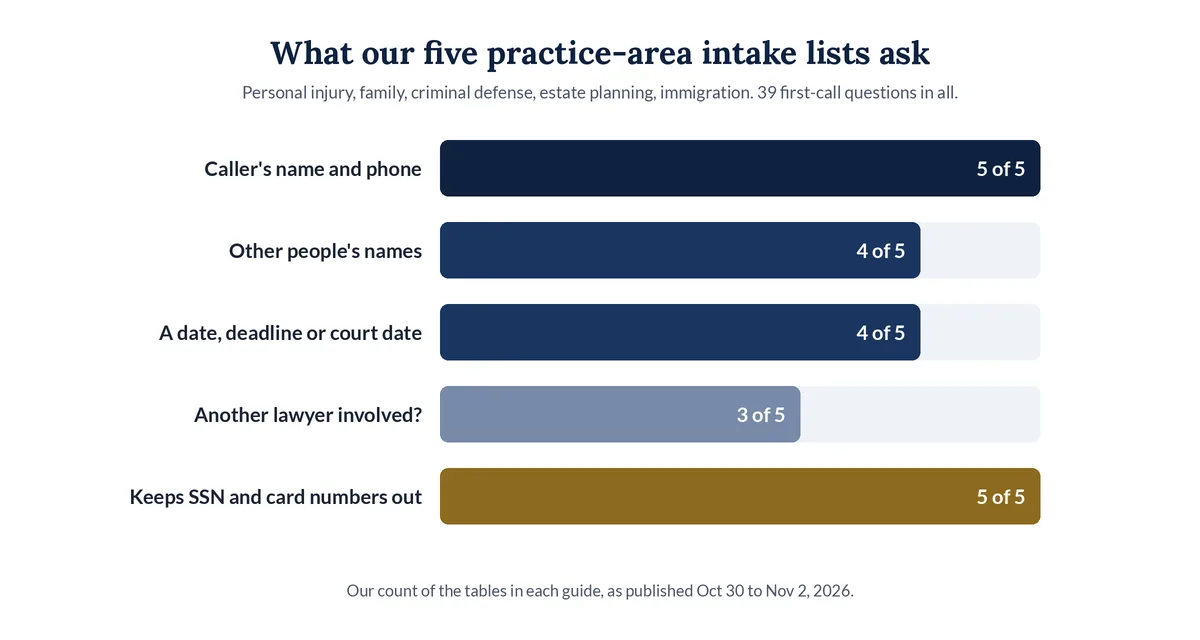
We compared the intake lists in our five practice-area guides. All five keep sensitive numbers out of the first call, and none asks for the full story:
What our five practice-area intake lists ask on the first call (our count, Nov 4, 2026)
| Practice area | First-call questions | Of those, optional | Topics marked skip | Caller's name and phone | Other people's names | A date, deadline, or court date | Another lawyer involved? | Keeps Social Security and card numbers out |
|---|---|---|---|---|---|---|---|---|
| Personal injury | 11 | 0 | 0 (lists 11 things the AI should not do) | Yes | Yes | Yes | Yes | Yes |
| Family law | 8 | 1 | 2 | Yes | Yes | Yes | Yes | Yes |
| Criminal defense | 7 | 1 | 2 | Yes | Yes | Yes | Yes | Yes |
| Estate planning | 6 | 1 | 4 | Yes | Yes | No | No | Yes |
| Immigration (English and Spanish) | 7 | 0 | 0 | Yes | No | Yes | No | Yes |
| All five | 39 | 3 | 8 | 5 of 5 | 4 of 5 | 4 of 5 | 3 of 5 | 5 of 5 |
Counted by our data script from the tables in each guide, as published Oct 30 to Nov 2, 2026. "Optional" means the guide says to ask only if your firm wants it.
Put these in a "never" list at the top of the script:
- Never ask for Social Security, account, or card numbers, or passwords.
- Never ask for the full story, statements to police, or who should inherit what. Those belong in a private talk with the attorney.
- Never say whether the caller has a case, what it is worth, or how long they have to file.
- Never promise the firm will take the matter, and never quote fees unless the firm approved the exact words.
- Never pretend to be a person.
What should an AI receptionist say when a caller asks for legal advice?
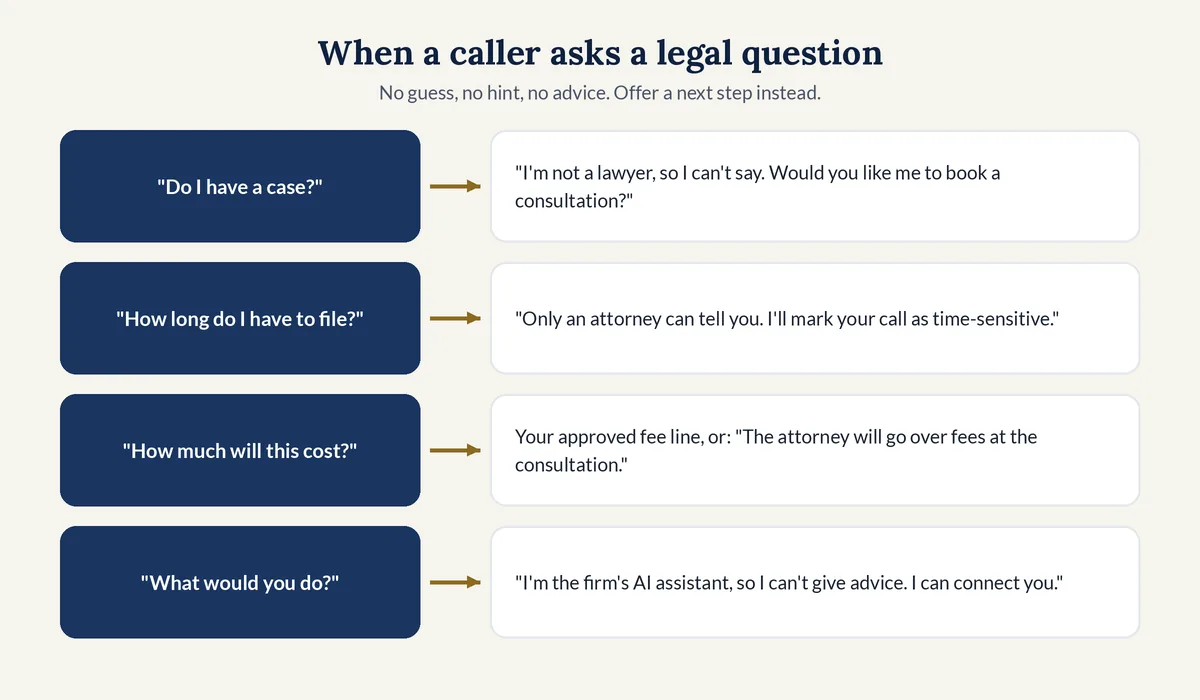
When a caller asks for legal advice, the AI receptionist should say it is the firm's AI assistant, not a lawyer, so it can't give legal advice, and then offer the next step: a transfer, a booked consultation, or a message for the attorney. It should not guess, hint, or soften the answer into advice.
| Caller asks | Script line |
|---|---|
| "Do I have a case?" | "I'm not a lawyer, so I can't say. An attorney can look at that with you. Would you like me to book a consultation?" |
| "How long do I have to file?" | "Deadlines are something only an attorney can tell you. I'll mark your call as time-sensitive so the firm sees it first." |
| "What should I tell the insurance company or the police?" | "I can't advise you on that. I can get your details to an attorney right away." |
| "How much will this cost?" | Your approved fee line, or: "The attorney will go over fees with you at the consultation. Would you like a time?" |
| "Can you just tell me what you would do?" | "I'm the firm's AI assistant, so I can't give advice. I can connect you with someone who can." |
If you take Spanish-speaking callers, write the same lines in Spanish and have a native speaker review them. A sample: "Soy el asistente de inteligencia artificial de la oficina, no un abogado, así que no puedo darle consejos legales. Con gusto le hago una cita con uno de los abogados de la oficina." Our guide to bilingual AI intake for immigration firms has seven intake questions in both languages.
How should the script handle urgent and emergency calls?
The script should tell anyone in danger to hang up and call 911 first, before any intake question. For other urgent calls, such as an arrest or a court date tomorrow, it should take the essentials, flag the call by your firm's definition of urgent, and transfer or alert the on-call attorney.
Template lines:
- Danger now: "If you or anyone else is in danger right now, please hang up and call 911."
- Safe to talk: "Is it safe for you to talk right now? Is it OK if the firm calls or texts this number?"
- Domestic violence support: "The National Domestic Violence Hotline is free and open 24/7 at 1-800-799-7233, or you can text START to 88788." (The Hotline)
- Urgent, during office hours: "This sounds time-sensitive. I'm letting the attorney know now and connecting you. Please stay on the line."
- Urgent, after hours: "I'm marking this urgent and sending it to the attorney on call right now."
Write down what "urgent" means for your firm. Examples: an arrest or someone in custody, a court date within two days, papers served with a deadline, a protective order, or a recent death in an estate matter.
What practice-area questions should you add to the script?
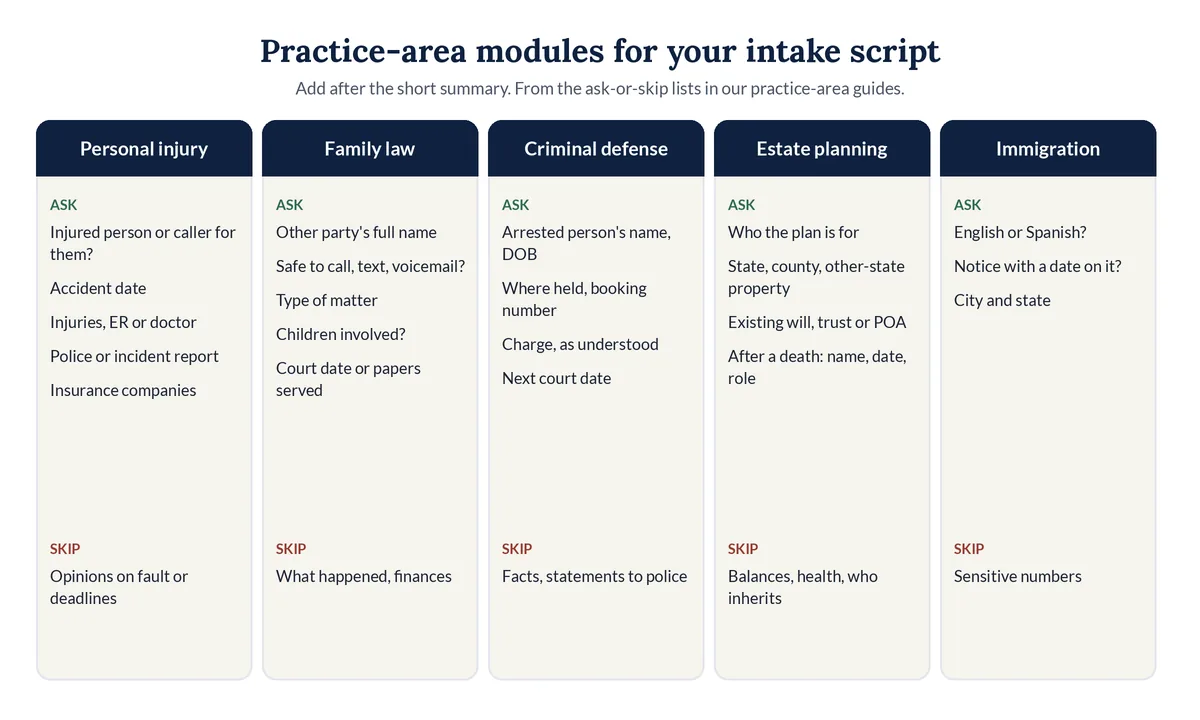
Add three to six practice-area questions after the short summary, and only ones whose answers change the next step. Personal injury needs the accident date and injuries; family law, the other party's name and safe contact; criminal defense, where the person is held; estate planning, who the plan is for; immigration, any notice date.
Each module below is drawn from the ask-or-skip list in our practice-area guide for that area. Use the one that fits each call after question 5.
- Personal injury. "Are you the injured person, or calling for someone else?" "When did the accident happen?" "What injuries, and any ER visit or doctor?" "Was a police or incident report made?" "Which insurance companies are involved?" Our personal injury intake question map also lists what the AI should not say on each one.
- Family law. "What is the other party's full name?" "Is it safe to call, text, or leave a voicemail at this number?" "Is this about divorce, custody, support, a protective order, or something else?" "Are children involved?" "Any court date or papers served?"
- Criminal defense. "What is the arrested person's full name and date of birth?" "Where are they being held, and do you have a booking number?" "What is the charge, as you understand it?" "When is the next court date?" Skip what happened and anything said to police.
- Estate planning. "Who is the plan for?" "Which state and county, and is there property in another state?" "Is there an existing will, trust, or power of attorney?" After a death: "What was the person's name, the date, and your role?" Skip balances, health details, and who should inherit what.
- Immigration. "Would you like to continue in English or Spanish?" "Did you receive a letter or notice with a date on it? What is the date?" "What city and state do you live in?"
How should an intake script end the call?
An intake script should end every call with one clear next step said out loud: a live transfer, a booked consultation with the date and time, a referral, or a message with when to expect a callback. It should repeat that talking with the AI doesn't mean the firm has agreed to represent the caller.
Closing templates for each outcome:
- Transfer: "Thank you, [name]. I'm connecting you with [attorney] now. If they can't pick up, I'll book a time for you."
- Booked: "You're booked for [day] at [time]. You'll get a confirmation by text and email. Is there anything else the attorney should know before then?"
- Not a fit: "Thank you for calling. The firm doesn't handle this kind of matter, but here is a number that may help: [referral number]."
- Message: "I've sent your message to the attorney. Talking with me today doesn't mean the firm has agreed to represent you."
How does Legal Touch AI use your intake script?
Legal Touch AI turns your script into the questions it asks, one at a time, in plain words. It says it is your firm's AI assistant, gives a recording notice, and asks your screening questions. On Done for You plans, good callers go to you live during office hours, and after hours it books the consult on your calendar.
Per our how it works page, you choose the questions, and the script covers each outcome:
- If a caller says no to recording, it follows the option you chose at setup, such as taking a short message.
- Callers you don't serve are told politely and can get a referral number you give us.
- Transfers come with a text to you first. If you don't answer by the third ring, it goes back to the caller and books a time instead.
- Urgent calls are defined by you, such as an arrest or a court date tomorrow.
It never gives legal advice or predicts a result, never decides conflicts or promises your firm will take the case, never quotes your fees unless you approve the exact wording, never pretends to be a person, and never asks for Social Security numbers, card numbers, or passwords.
On the Starter plan, you set up our legal receptionist template yourself, from $149 a month. On Done for You plans, your greeting, AI disclosure, recording notice, and screening questions are written with you, with script changes on request, usually within 1 business day. Before any real caller reaches it, we run test calls with you on a private line. See Legal Touch AI plans and pricing, and our complete guide to choosing an AI receptionist for a small firm for a full call from start to finish.
Why we wrote this guide
We set up Legal Touch AI on our own phone lines first, greeting callers and asking our screening questions, before offering it to small law firms. The hardest part of every setup is not the technology. It is the script: what to ask, what to skip, and the exact words for a caller who wants advice. This guide puts our practice-area lists in one place.
Hear a script in action. Book a 15-minute Legal Touch AI demo and ask it the questions your callers ask.
Frequently asked questions
Who should approve a law firm intake script?
A lawyer at the firm should approve the intake script before it takes a real call, and again after any change. ABA Model Rule 5.3 makes lawyers responsible for giving outside services directions that keep their conduct in line with the lawyer's own duties. The vendor can draft the wording, but the firm decides it.
Should an intake script say the call does not create an attorney-client relationship?
Many firms add that line to the greeting or the close. Comment [2] to ABA Model Rule 1.18 says clear warnings that limit the lawyer's obligations matter when a firm invites a caller to share information. Have your own lawyer choose the exact words, since state rules and firm practice differ.
Can the same intake script work for a live receptionist and an AI?
Mostly, yes. The questions, the never list, and the urgent rules can be the same. An AI script needs more: an AI disclosure in the greeting, exact replies for questions it must not answer, and written rules for every outcome, because an AI follows its instructions instead of using a person's judgment on a new situation.
How often should a law firm update its intake script?
Review the script every week for the first month after launch, using real call recordings and summaries, and then at least once a quarter. Update it right away when you add a practice area, change your fees or hours, change who takes transfers, or find a good caller who was turned away.
Should an AI receptionist read the intake script word for word?
It should say the greeting, the AI disclosure, the recording notice, and the limits line word for word, because those carry legal weight. For the questions, the wording can flex slightly so the call sounds natural, as long as the AI asks one question at a time and never adds a question you didn't approve.
Legal Touch AI is not a law firm and does not provide legal advice. This article is general information, not a legal opinion on your firm's duties. Using Legal Touch AI does not create an attorney-client relationship. Have a lawyer licensed in your state review your intake script before it takes real calls.
Sources (checked Nov 4, 2026)
- Clio, Legal Trends Report press release (Oct 21, 2019): https://www.clio.com/about/press/clios-legal-trends-report-reveals-law-firms-struggle-to-respond-to-client-inquiries/
- ABA Model Rule 1.18, Duties to Prospective Client, Comment: https://www.americanbar.org/groups/professional_responsibility/publications/model_rules_of_professional_conduct/rule_1_18_duties_of_prospective_client/comment_on_rule_1_18_duties_of_prospective_client/
- ABA Model Rule 5.3, Responsibilities Regarding Nonlawyer Assistance, Comment: https://www.americanbar.org/groups/professional_responsibility/publications/model_rules_of_professional_conduct/rule_5_3_responsibilities_regarding_nonlawyer_assistant/comment_on_rule_5_3/
- ABA Formal Opinion 512, Generative Artificial Intelligence Tools (July 29, 2024): https://www.americanbar.org/content/dam/aba/administrative/professional_responsibility/ethics-opinions/aba-formal-opinion-512.pdf
- Florida Bar Ethics Opinion 24-1 (Jan 19, 2024): https://www.floridabar.org/etopinions/opinion-24-1/
- Utah Code 13-77-103, Required disclosures: https://le.utah.gov/xcode/Title13/Chapter77/C13-77-S103_2025050720250507.html
- National Domestic Violence Hotline: https://www.thehotline.org/
- Legal Touch AI, how it works: https://legaltouchai.com/how-it-works/
- Legal Touch AI pricing: https://legaltouchai.com/pricing/