Virtual Receptionist for Solo Attorneys: How to Stop Being Your Own Front Desk
A virtual receptionist for attorneys is an outside service, staffed by people, AI, or both, that answers a firm's calls when no one at the firm can. It greets the caller, asks screening questions, books a consultation or takes a message, and sends the attorney a summary. For a solo attorney, it is often the only front desk there is.
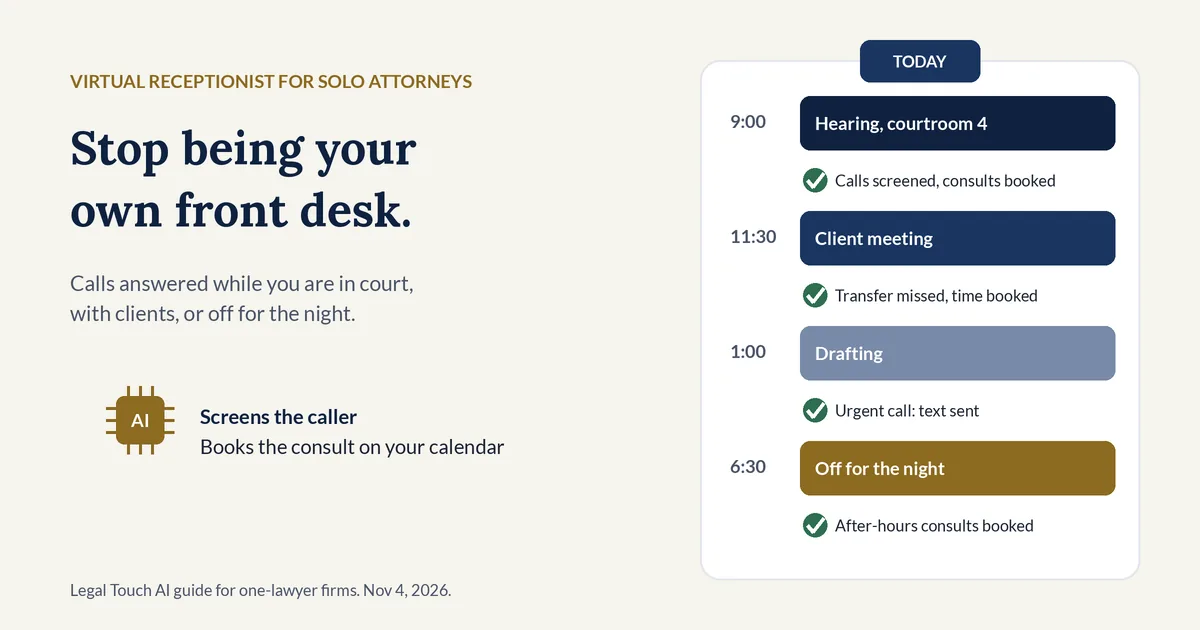
Solo lawyers already lean on this kind of help. Among solo firms that have used AI, 27% have used virtual receptionists, compared with 16% of small firms, according to Clio's 2025 Legal Trends for Solo and Small Law Firms report (Clio, May 2025). The report's explanation: "since solo practitioners manage all aspects of their practice, outsourcing receptionist tasks allows them to focus more on legal work without hiring full-time staff" (full report, PDF).
What is a virtual receptionist for attorneys?
A virtual receptionist for attorneys is a remote service that answers a law firm's phone from outside the office. Some use trained people, some use AI, and some combine both. A good one does more than take messages: it screens new callers, separates current clients, books consultations, and flags urgent calls for the attorney.
The terms overlap, so here is how they differ for a one-lawyer practice:
| Option | Who answers | When | Screens and books? | Fits a solo who |
|---|---|---|---|---|
| Voicemail | No one | Always, but nothing happens until you call back | No | Gets few new-client calls and returns calls the same day |
| Message-taking answering service | People, from a script | Often around the clock | Takes a message; screening varies | Mostly needs a polite human greeting |
| Live virtual receptionist | Trained people, remotely | Set hours or around the clock, by plan | Yes, from your questions | Wants a human voice on every call |
| AI receptionist | AI, with your script | Around the clock | Yes, one question at a time | Wants every call answered at a flat monthly cost |
| In-house receptionist | An employee at your desk | Office hours | Yes, plus mail, filing and visitors | Has walk-in clients and enough work for a full-time hire |
An AI receptionist is a virtual receptionist where software, not a person, holds the conversation. It should tell callers it is AI, and it must never give legal advice.
Why do solo attorneys miss so many calls?
Solo attorneys miss calls because the person who answers the phone is also in court, meeting clients, drafting, and driving. Even a full-time receptionist on a 40-hour weekday schedule covers 40 of the 168 hours in a week. The other 128 hours, 76% of the week, are nights, weekends, and holidays.
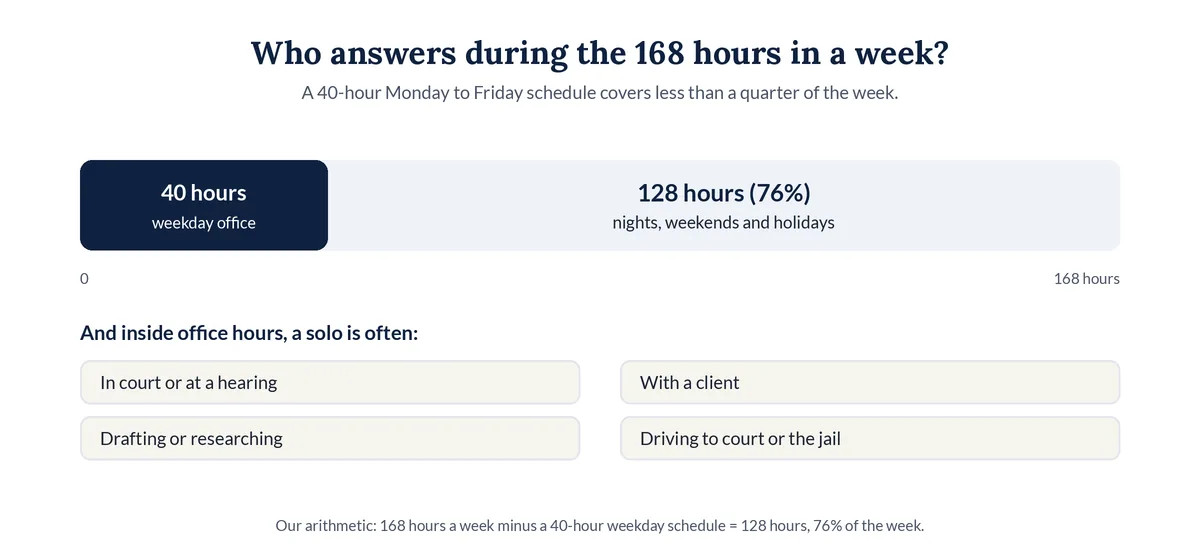
During office hours, a solo's phone still rings at the worst times:
- In court or at a hearing. Phones are off, and a hearing can run long.
- With a client. Picking up mid-meeting is rude, and the caller can tell you are distracted.
- Deep in drafting or research. Every interruption costs time to get back on track.
- Driving to court, the jail, or a closing. You can't take notes or check your calendar.
- Out sick or on vacation. With no staff, the phone simply stops being answered.
The cost shows up in Clio's 2019 secret-shopper study, where 39% of calls to law firms went to voicemail and 79% of surveyed consumers said they expected a response within 24 hours (Clio press release, Oct 21, 2019).
Existing clients count too. Comment [4] to ABA Model Rule 1.4 says that when a prompt response is not feasible, "the lawyer, or a member of the lawyer's staff" should "acknowledge receipt of the request and advise the client when a response may be expected," and that "A lawyer should promptly respond to or acknowledge client communications" (ABA Model Rule 1.4, Comment). A solo has no staff to do that. A receptionist can tell a client the message reached you and when to expect a reply, though the duty to respond stays with you.
Does a solo attorney need a receptionist?
A solo attorney needs every new-client call answered, but not necessarily a full-time hire. If you take new matters by phone and spend hours each week in court or meetings, a virtual receptionist covers those gaps for far less than a salary. If new-client calls are rare, voicemail with a same-day callback may be enough.
A hire still makes sense in some practices. The Bureau of Labor Statistics lists receptionist duties such as "Answer the telephone and take messages or forward calls" and "Schedule and confirm appointments and maintain calendars," and notes that "Most receptionists work full time" (BLS Occupational Outlook Handbook, Receptionists). A person at your desk can also greet walk-ins, sort mail, and file papers.
- A virtual receptionist fits when most clients first reach you by phone, you are out of the office often, and your callers arrive at all hours.
- A hire fits when you have walk-in traffic, paper-heavy work, and enough tasks to fill a full-time week.
- Both fit when you want a person by day and coverage for nights, weekends, lunch, and court days.
How much does a virtual receptionist cost for a solo attorney?
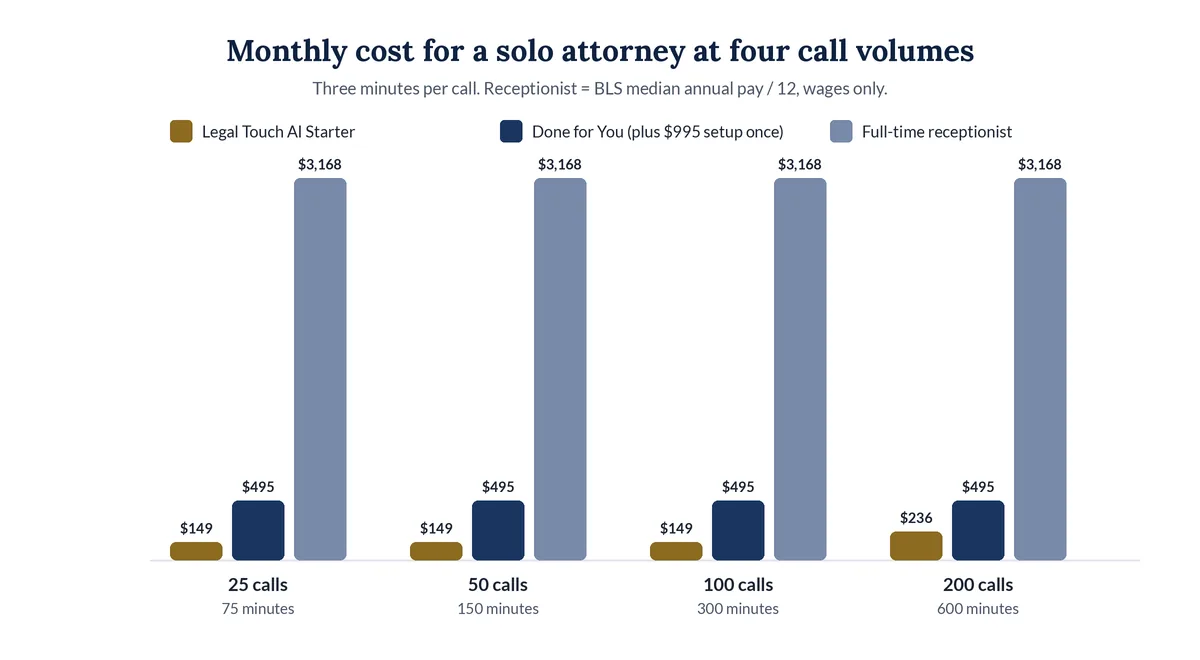
For most solo call volumes, a virtual receptionist costs a small fraction of a hire. Legal Touch AI starts at $149 a month for 300 call minutes. A full-time receptionist at the BLS median wage of $18.27 an hour earns about $3,168 a month, before payroll taxes, benefits, and time off. Other services set their own prices.
Monthly cost for a solo at four call volumes (our arithmetic, Nov 4, 2026)
| New and returning calls a month | Minutes at 3 per call | Legal Touch AI Starter | Legal Touch AI Done for You | Full-time receptionist, wages only |
|---|---|---|---|---|
| 25 | 75 | $149 | $495 | $3,168 |
| 50 | 150 | $149 | $495 | $3,168 |
| 100 | 300 | $149 | $495 | $3,168 |
| 200 | 600 | $236 | $495 | $3,168 |
How we got these numbers: our pricing page lists Starter at $149 for 300 minutes and Done for You at $495 for 600 minutes, with extra minutes at $0.29 each. We used the page's own "three-minute calls" estimate; your calls may run longer or shorter. Done for You adds a $995 one-time setup in the first month. The wage column is the BLS median annual pay of $38,010 divided by 12.
For published prices from other services, by call volume, see our legal answering service cost breakdown for 2026.
What should an AI receptionist for solo lawyers do on each call?
An AI receptionist for solo lawyers should answer on the first ring, say it is AI, give a recording notice, ask your screening questions one at a time, and then take one clear action: transfer a good caller when you are free, book a consultation when you are not, flag urgent calls, and politely refer callers you don't serve.
Here is how that works call by call, using what our how it works page describes:
| Call | What the AI does | What you see |
|---|---|---|
| New caller, good fit, you are free | Texts you first, then rings your cell or desk phone | "New caller" text, then the call |
| New caller, you don't pick up by the third ring | Goes back to the caller and books a time instead | A "missed transfer" text |
| New caller after hours | Offers two open times from your Google or Outlook calendar | The meeting on your calendar with name, phone, and notes |
| Urgent call, by your definition | Flags it right away and can ring your cell | An "URGENT" text and email |
| A matter you don't take | Says so politely and can share a referral number you give us | The call marked "Not a fit" in your summary |
| Caller hangs up early | Sends a text back within about a minute | The call in your summary |
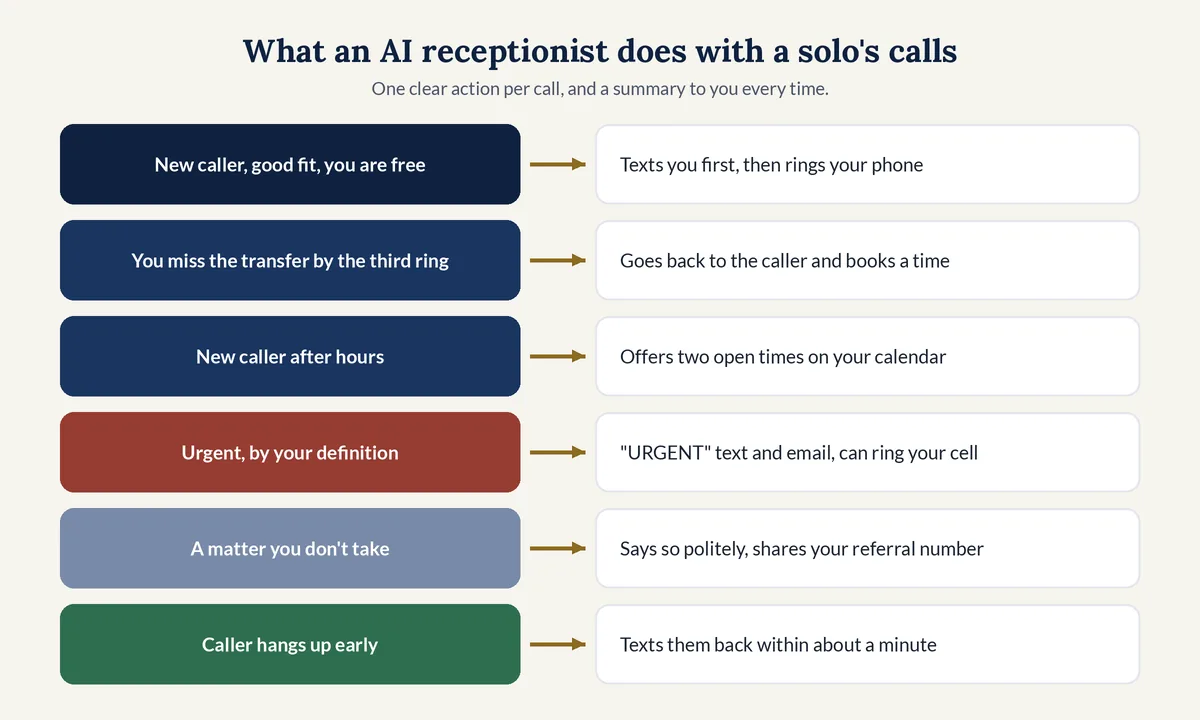
After every call you get a short text with name, phone, need, and outcome, and an email with every answer, the recording, and the transcript.
How do you set up a virtual receptionist as a solo attorney?
To set up a virtual receptionist as a solo attorney, track a week of calls, choose your coverage hours, write your screening questions, set transfer and urgent rules, connect your calendar, test on a private line, and only then forward your number. Review every summary for the first two weeks and adjust.
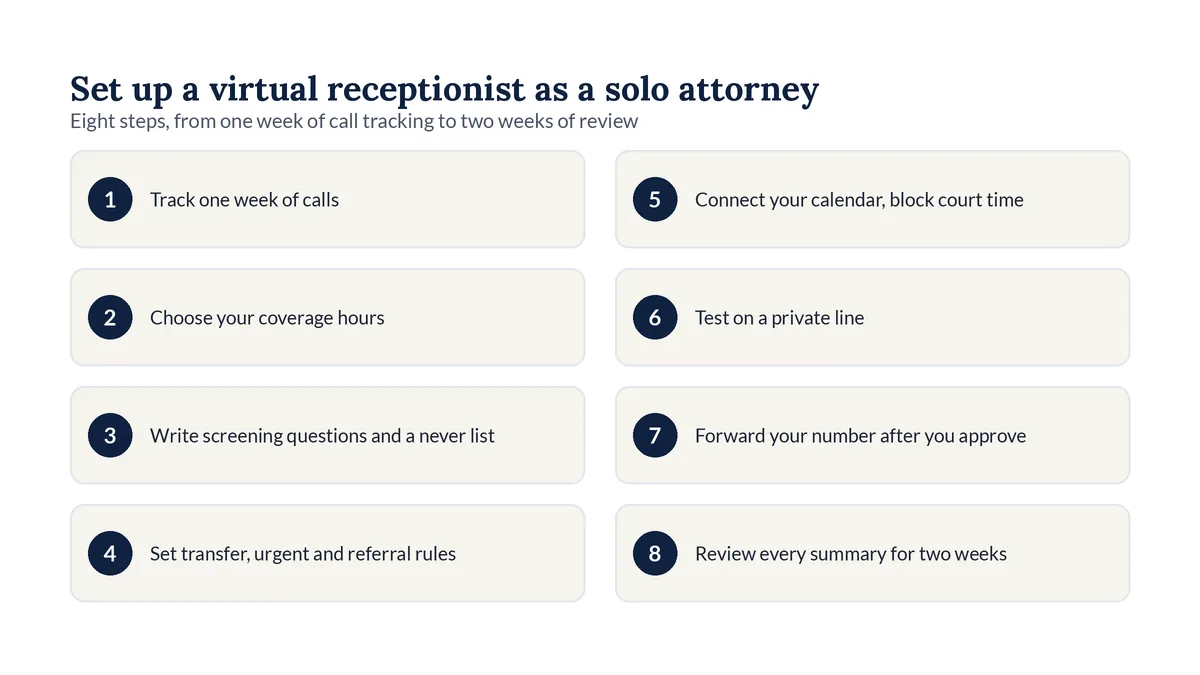
- Track one week of calls: when they come in, who is calling, and how many you missed or returned late.
- Choose your coverage: every call, only calls you don't answer, or nights and weekends only.
- Write your screening questions and a short list of things the receptionist must never say or ask.
- Set your rules: when your phone should ring, what counts as urgent, and which referral number to give.
- Connect your calendar, with consultation lengths and buffer time blocked around court and travel.
- Test the setup on a private line with your hardest calls before any real caller reaches it.
- Forward your office number only after you approve how every test call sounded.
- Review each call summary for the first two weeks and fix the script where a good caller slipped through.
For copy-ready greeting, question, and closing lines, use our law firm intake script templates.
How should a virtual receptionist handle calls while you are in court?
While you are in court, the receptionist should not try to transfer new callers to you. It should screen them, book a consultation in an open slot on your calendar, and text you only for calls you defined as urgent. Block court time on your calendar so it never offers a slot you can't keep.
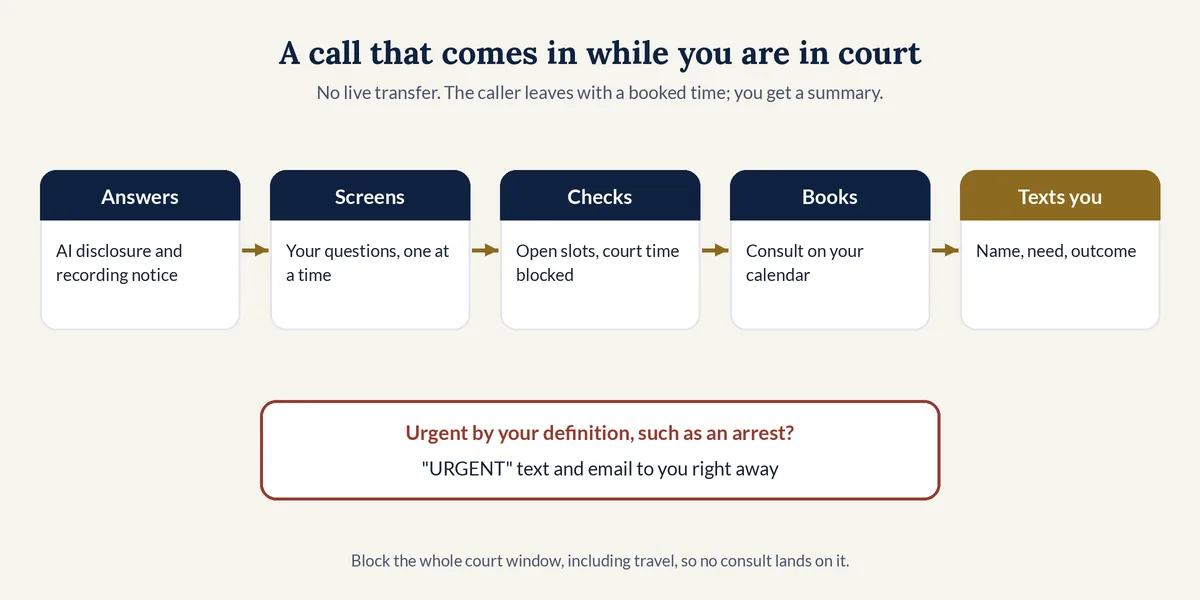
A court-day routine to start from:
- Block the whole court window, including travel and waiting time, not just the hearing.
- Turn off live transfers for that window, or accept that most will fall back to a booked time.
- Keep the urgent list short, such as an arrest or a court date tomorrow, so a text from the receptionist always means "read this now."
- Read summaries at breaks. Each one shows the caller's name, need, and the outcome, so a quick callback starts prepared.
- Tell current clients your court-day rhythm, so they know a same-day reply is coming.
Can a virtual receptionist cover nights, weekends, and vacations?
Yes. Most virtual receptionists can answer around the clock, and some solos use one only outside office hours. At night and on weekends it should screen callers and book consultations for your next open day. During a vacation, it should tell callers when you return and send urgent calls to whoever covers for you.
For a solo, "after hours" is more than nights:
- Nights and weekends. New clients often call after their own workday ends.
- Holidays. Your calendar should block them so no consult lands on a closed day.
- Vacations and sick days. Give the receptionist your return date and a covering attorney's number, if you have one, for urgent matters.
- Lunch and long meetings. Overflow coverage catches calls you would otherwise send to voicemail.
On our plans, after-hours-only answering is a setting, so you can answer by day and let the AI cover the rest. For an after-hours plan built around court days and weekends, see our guide to after-hours answering for lawyers.
What ethics rules apply when a solo attorney uses a virtual receptionist?
Using a virtual receptionist makes the solo attorney responsible for an outside nonlawyer service. ABA Model Rule 5.3 requires reasonable efforts to ensure the service is compatible with your professional obligations, and confidentiality rules apply to every recording and summary. If the receptionist is AI, it should say so and never give legal advice.
ABA guidance a solo can act on:
- Supervise the outside service. Comment [3] to Rule 5.3 says a lawyer using services outside the firm "must make reasonable efforts to ensure that the services are provided in a manner that is compatible with the lawyer's professional obligations" (ABA Model Rule 5.3, Comment).
- Read the vendor's terms. ABA Formal Opinion 498 on virtual practice says lawyers "should ensure that they have carefully reviewed the terms of service" to see "whether confidentiality is protected," that "any recordings or transcripts should be secured," and that lawyers "should consider use of a confidentiality agreement" with outside vendors when appropriate (ABA Formal Opinion 498, Mar 10, 2021).
- Write down your AI rules. ABA Formal Opinion 512 says managerial lawyers "must establish clear policies regarding the law firm's permissible use of GAI" (ABA Formal Opinion 512, July 29, 2024). In a solo practice, that manager is you. Clio's 2026 report found that "57% of solo firms and 55% of small firms have no AI policy in place" (Clio 2026 Legal Trends for Solo and Small Law Firms, PDF).
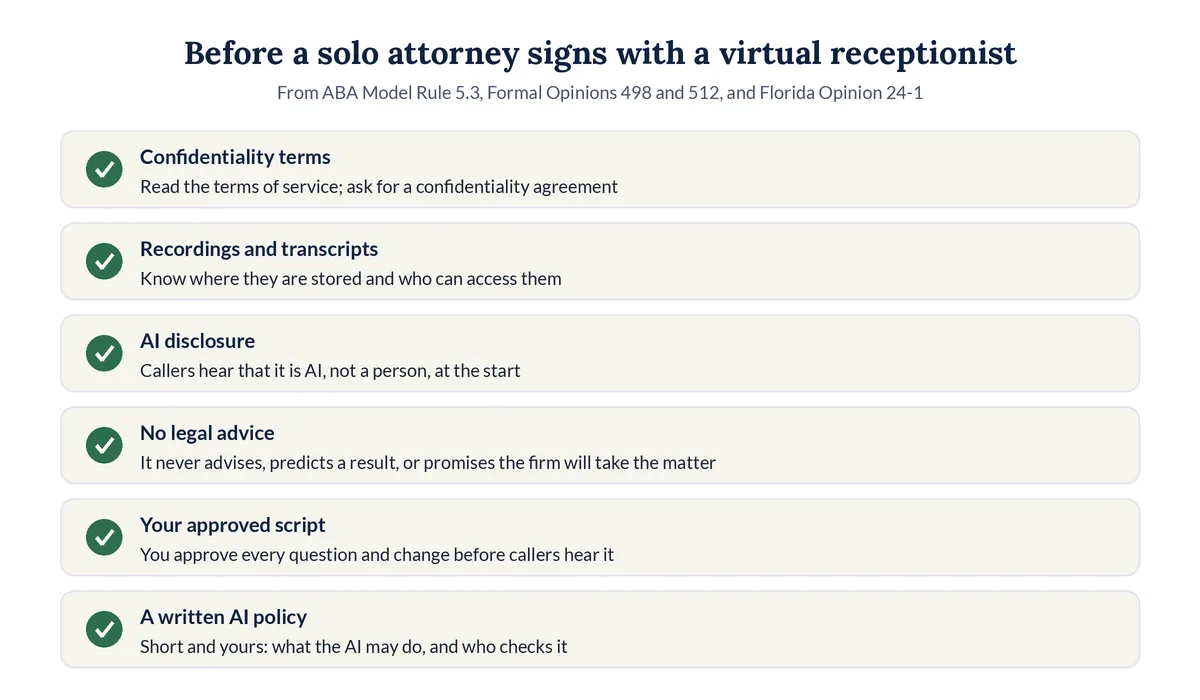
Questions to ask any vendor before you sign:
- Where are recordings, transcripts, and summaries stored, and who can access them?
- Will you sign a confidentiality agreement?
- Does the receptionist say it is AI, or that it is not a lawyer, at the start of the call?
- Who approves script changes, and how fast are they made?
- How do I cancel, and what happens to my call data when I do?
Disclosure and recording rules vary by state. Our guide to AI receptionist ethics and disclosure rules covers them in more depth.
Should a solo attorney choose a live or AI virtual receptionist?
Choose a live virtual receptionist if you want a human voice on every call and your budget allows it. Choose an AI receptionist if you want every call answered around the clock at a flat monthly cost, with screening and booking done the same way each time. Some solos use people by day and AI after hours.
- Live people may fit better if many callers are in distress and need a person to slow down with them, or if your intake depends on judgment calls you can't write into rules.
- AI may fit better if call volume swings week to week, many calls come after hours, or you want the same questions asked the same way on every call.
- Either way, insist on your own screening questions, a summary after every call, and a test before launch.
For how an AI receptionist handles a full call, and what to ask before you choose one, see our full guide to AI receptionists for small law firms.
How does Legal Touch AI work for a solo attorney?
Legal Touch AI answers your calls on the first ring, says it is your firm's AI assistant, gives a recording notice, and asks your screening questions one at a time. On Done for You plans, it texts you before a live transfer during office hours and books consultations on your Google or Outlook calendar after hours.
What a solo gets on each plan, from our plans and pricing page:
- Starter, $149 a month. Our legal receptionist template, set up by you. 300 call minutes, answers 24/7 on the first ring, a call summary, recording, and transcript after every call, and missed-call text-back. No setup fee.
- Done for You, $495 a month plus a $995 setup. We build it, run it, and keep improving it. 600 call minutes, live transfers during office hours with a text to you first, consults booked on your calendar, and script changes on request, usually within 1 business day.
- Every plan is month to month, and every plan can answer after hours only.
It never gives legal advice or predicts a result, never decides conflicts or promises your firm will take the case, never quotes your fees unless you approve the exact wording, never pretends to be a person, and never asks for Social Security numbers, card numbers, or passwords. Before any real caller reaches it, we run test calls with you on a private line.
Why we wrote this guide
Our own callers are often stressed, and many call after work or on weekends. We needed every call answered, so we set up Legal Touch AI on our own lines first, before offering it to small law firms. Solo attorneys face the same problem with even fewer hands. This guide is the setup we would give a one-lawyer practice on day one.
Hear how it would answer your calls. Book a 15-minute Legal Touch AI demo and call it the way your clients do.
Frequently asked questions
Can a virtual receptionist book consultations on a solo attorney's calendar?
Yes, if it connects to your calendar. Legal Touch AI checks your Google or Outlook calendar on Done for You plans, offers the caller two open times, and puts the meeting on your calendar with the caller's name, phone, and notes. Block court, travel, and personal time first so it only offers slots you can keep.
Will callers know they are talking to an AI receptionist?
They should, and with Legal Touch AI they do. The first thing a caller hears is that they are talking to the firm's AI assistant, not a person, followed by a recording notice. Florida Bar Ethics Opinion 24-1, an advisory opinion, says AI chatbots that talk with clients must disclose that they are AI.
Can a solo attorney keep the same office number with a virtual receptionist?
Yes. Many virtual receptionists work through call forwarding, so callers dial the number they already have. With Legal Touch AI, you turn on forwarding with your phone company after you approve the test calls, and you can turn it off yourself at any time. Your number stays yours throughout.
What happens if a solo attorney misses a live transfer?
With Legal Touch AI, if you don't answer by the third ring, the call goes back to the caller and the AI books a time instead. You get a "missed transfer" text, and the summary shows the caller's name, phone, and need, so you can call back prepared instead of starting cold.
Is a virtual receptionist worth it for a solo attorney with few calls?
It can be, if those few calls are new clients you would otherwise lose to voicemail. If one retained matter is worth more than a year of a low-cost plan, the math is simple. If almost all of your calls are from current clients and you return them the same day, voicemail and a clear greeting may be enough.
Legal Touch AI is not a law firm and does not provide legal advice. This article is general information, not a legal opinion on your duties. Using Legal Touch AI does not create an attorney-client relationship. Check your state's rules of professional conduct and recording laws before you choose a virtual receptionist.
Sources (checked Nov 4, 2026)
- Clio, Highlights From the 2025 Legal Trends for Solo and Small Law Firms Report (updated May 15, 2025): https://www.clio.com/blog/solo-small-law-firms-highlights-2025-legal-trends/
- Clio, 2025 Legal Trends for Solo and Small Law Firms report (PDF): https://www.clio.com/wp-content/uploads/2025/05/2025-Solo-LTR-Digital.pdf
- Clio, 2026 Legal Trends for Solo and Small Law Firms report (PDF): https://www.clio.com/wp-content/uploads/2026/04/2026-Solo-and-Small-Legal-Trends-Report.pdf
- Clio, Legal Trends Report press release (Oct 21, 2019): https://www.clio.com/about/press/clios-legal-trends-report-reveals-law-firms-struggle-to-respond-to-client-inquiries/
- U.S. Bureau of Labor Statistics, Occupational Outlook Handbook, Receptionists: https://www.bls.gov/ooh/office-and-administrative-support/receptionists.htm
- ABA Model Rule 1.4, Communication, Comment: https://www.americanbar.org/groups/professional_responsibility/publications/model_rules_of_professional_conduct/rule_1_4_communications/comment_on_rule_1_4/
- ABA Model Rule 5.3, Responsibilities Regarding Nonlawyer Assistance, Comment: https://www.americanbar.org/groups/professional_responsibility/publications/model_rules_of_professional_conduct/rule_5_3_responsibilities_regarding_nonlawyer_assistant/comment_on_rule_5_3/
- ABA Formal Opinion 498, Virtual Practice (Mar 10, 2021): https://www.americanbar.org/content/dam/aba/administrative/professional_responsibility/ethics-opinions/aba-formal-opinion-498.pdf
- ABA Formal Opinion 512, Generative Artificial Intelligence Tools (July 29, 2024): https://www.americanbar.org/content/dam/aba/administrative/professional_responsibility/ethics-opinions/aba-formal-opinion-512.pdf
- Florida Bar Ethics Opinion 24-1 (Jan 19, 2024): https://www.floridabar.org/etopinions/opinion-24-1/
- Legal Touch AI, how it works: https://legaltouchai.com/how-it-works/
- Legal Touch AI pricing: https://legaltouchai.com/pricing/