AI Receptionist for Workers' Compensation Lawyers: Injury Calls, Adjusters and Reporting Dates
An AI receptionist for workers' compensation lawyers is software that answers a workers' comp firm's phone, tells callers it is an AI, asks the firm's approved intake questions about the work injury, records the dates the caller gives, sorts adjusters and medical offices from new injured workers, and books consultations. This guide covers what to ask, who calls, the reporting and claim time limits six agencies publish, urgent calls, Spanish, cost, and setup, with sources checked Nov 10, 2026.
What is an AI receptionist for workers' compensation lawyers?
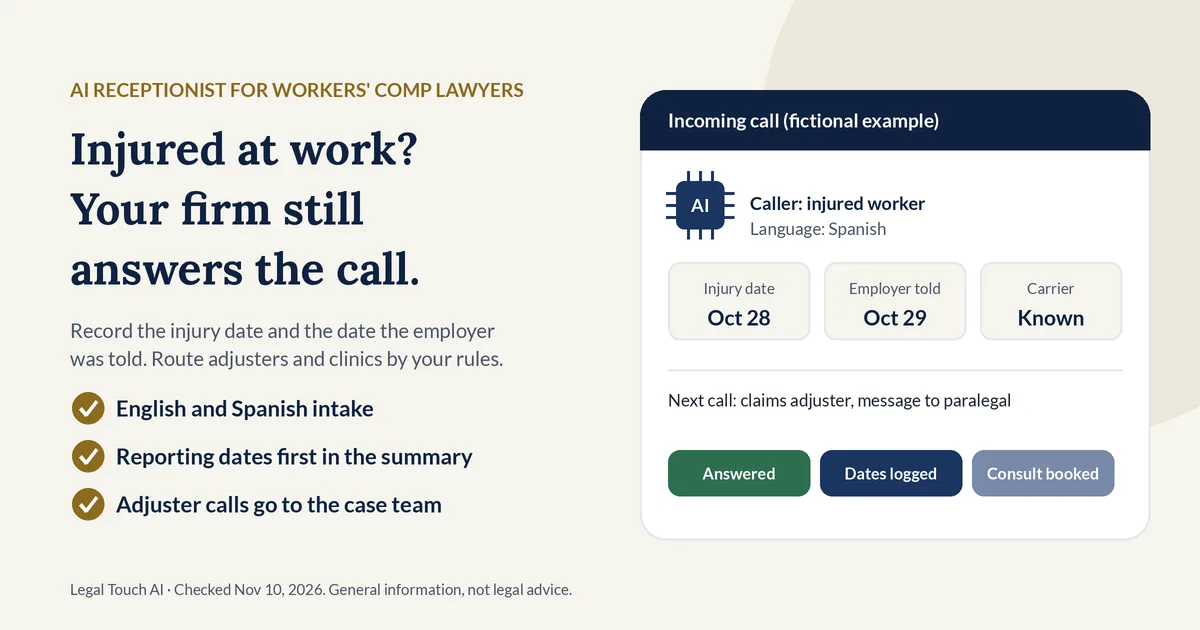
An AI receptionist for workers' compensation lawyers answers the firm's calls, says it is an AI, and follows the firm's intake script for work injury calls. It takes the employer name, the insurance carrier if known, the injury date, and the date the worker reported it, then books, transfers, or flags the call by the firm's rules.
A workers comp answering service is any service, staffed by people, AI, or both, that answers a workers' comp firm's phone when the team can't. The choice is less about technology and more about what each option does well:
| Option | Strong at | Weak at |
|---|---|---|
| Trained intake staff at the firm | Nuance, judgment calls, calming a caller in pain, spotting a fit | Nights, weekends, lunch, sick days, two calls at once |
| Live answering service | Taking messages with a human voice | Firm-specific screening unless well trained; per-minute bills add up |
| AI receptionist | Same questions on every call, around the clock, in English and Spanish | Nuance; it follows the script rather than reading between the lines |
| Voicemail | Costs nothing | A caller who reaches voicemail may call the next firm |
Our buyer's guide to AI phone answering for small law firms covers features and contracts in depth, and our side-by-side review of legal answering services compares named providers.
How many workers get hurt on the job each year?
Private industry employers reported 2.5 million nonfatal workplace injuries and illnesses in 2024, down 3.1% from 2023, according to the U.S. Bureau of Labor Statistics. Over 2023 and 2024 there were 1.8 million cases with days away from work, with a median of 8 days off, so many injured workers may be home during business hours.
The BLS series has drifted down for a decade. By our arithmetic from its Table 1, the 2024 total of 2,488,400 cases is 14.4% below the 2,905,900 reported for 2015.
| Year | Total recordable injury and illness cases, private industry (BLS, thousands) |
|---|---|
| 2015 | 2,905.9 |
| 2018 | 2,834.5 |
| 2020 | 2,654.7 |
| 2022 | 2,804.2 |
| 2023 | 2,569.0 |
| 2024 | 2,488.4 |
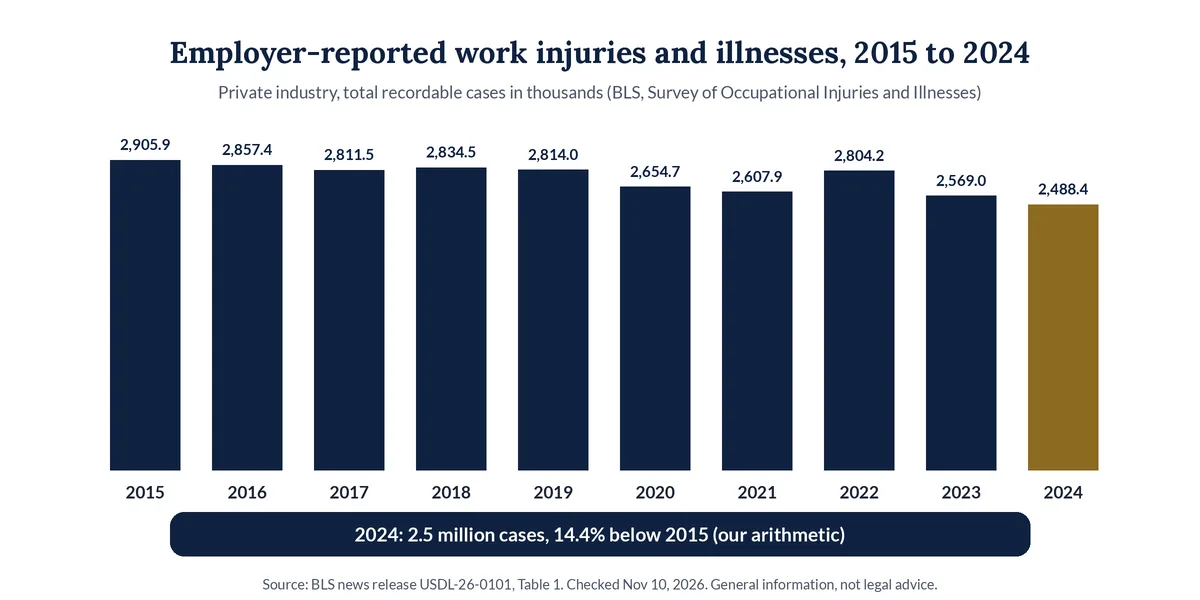
Source: BLS, Employer-Reported Workplace Injuries and Illnesses, 2023-2024 (Jan 22, 2026) and its Table 1. The figures cover private industry only and exclude farms with fewer than 11 employees. For phones, two BLS numbers matter: the median of 8 days away from work and the median of 15 days on job transfer or restriction. A worker on light duty or at home may call between appointments, during a lunch break, or after a shift. Your own call log shows when.
Who calls a workers' compensation law firm, and how should each call be routed?
A workers' comp firm hears from new injured workers, relatives calling for them, current clients, claims adjusters, employers, and medical offices. Each needs a different path: new workers get intake and a consultation, current clients reach their case team, and adjusters, employers, and clinics leave a detailed message for the assigned attorney or paralegal.
| Who is calling | What they usually want | A sensible default route (your firm decides) |
|---|---|---|
| New injured worker | To talk to a lawyer about a work injury | Intake questions, then book a consultation or transfer by your rules |
| Spouse or relative of a hospitalized worker | Help for someone who can't call | Take the relative's details and the worker's name; book a callback with the worker included |
| Current client | A question about a check, a doctor visit, or a letter | Name and claim number, then a message or transfer to their case team |
| Claims adjuster or insurance carrier | Records, a recorded statement, scheduling | Name, company, claim number; message to the assigned attorney; no case discussion |
| Employer or HR contact | Return-to-work or paperwork questions | Short message to the assigned attorney; no case discussion |
| Clinic, therapist, or nurse case manager | Authorization, records, appointment dates | Name, office, and callback number for the paralegal |
| Caller whose matter you don't handle | A referral | Kind reply and the referral number you approved |
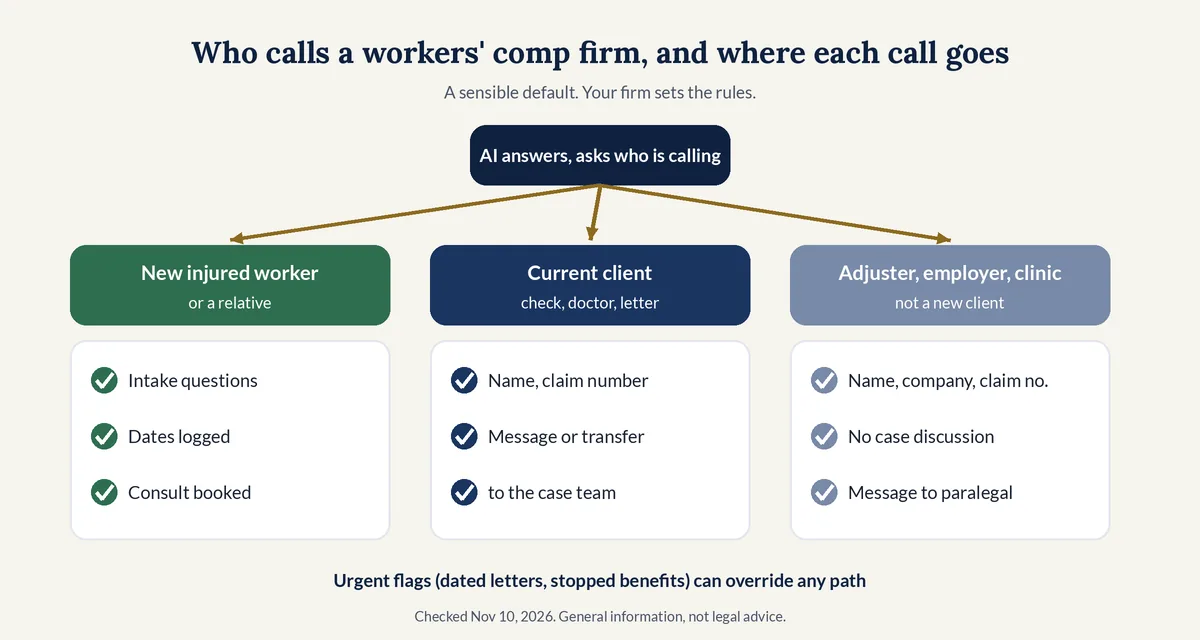
The adjuster row matters most. A caller from the carrier's side is not a new client, and the AI should not answer questions about the case. It takes a message and flags it. Our law firm intake script templates for an AI receptionist show how to write a caller-type question at the top of every call.
What should a workers' comp intake call ask?
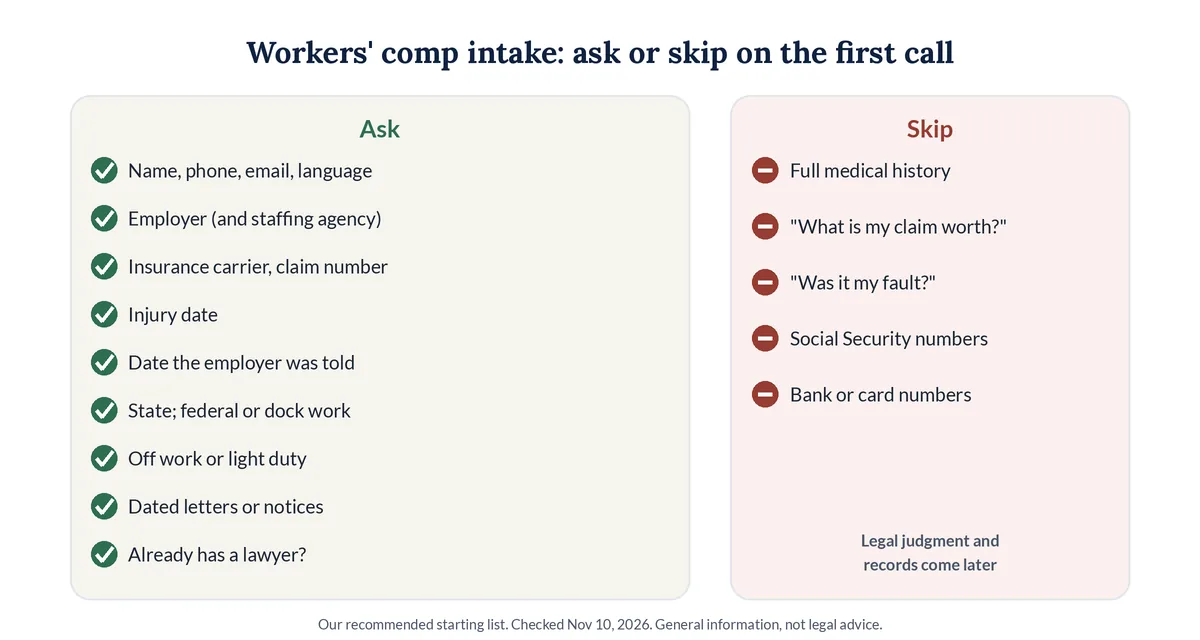
A workers' comp intake call should ask for contact details and preferred language, the employer, the insurance carrier if known, the injury date, when the employer was told, the state where it happened, whether the worker is off work, any dated denial letter or hearing notice, and whether another lawyer is involved.
Intake fields: ask or skip (our recommended starting list)
| Field | Ask on the first call? | Why |
|---|---|---|
| Caller's name, best phone and email, preferred language | Ask | Needed for the callback and the conflict check |
| Employer name, and the staffing agency if one placed the worker | Ask | Core of the conflict check; agencies add a second company |
| Workers' comp insurance carrier or claims administrator, and claim number if the caller has one | Ask, if known | Some firms check carriers for conflicts too |
| Date of injury, or the date the caller learned an illness was linked to work | Ask | Puts the key date at the top of the summary |
| Date the injury was reported to the employer, and how (in person, email, form) | Ask | Agencies publish a notice window; the attorney reviews it |
| State where the injury happened and where the worker is based | Ask | Decides which agency's rules the attorney looks at |
| Federal employee, or work on a dock, pier, or ship | Ask | Flags federal programs with their own rules |
| Off work, on light duty, or back at full duty | Ask | Signals lost wages without discussing amounts |
| Denial letter, hearing notice, or appointment set by the insurer, with any date on it | Ask | Often the reason for an urgent flag |
| Already has a lawyer for this injury? | Ask | Avoids stepping into another lawyer's matter |
| Full medical history, diagnoses, or medication lists | Skip | The attorney gathers records later |
| "What is my claim worth?" or "Was it my fault?" | Skip | Legal judgment belongs with the attorney |
| Social Security, bank, or card numbers | Skip | Never needed on a first call |
If the caller describes a medical emergency, the AI should tell them to call 911 first. California's Division of Workers' Compensation gives injured workers the same instruction: "call 911 or go to an emergency room right away." Our guide to screening intake callers without losing good cases covers screening rules for every practice area.
What reporting and claim time limits do workers' comp agencies publish?
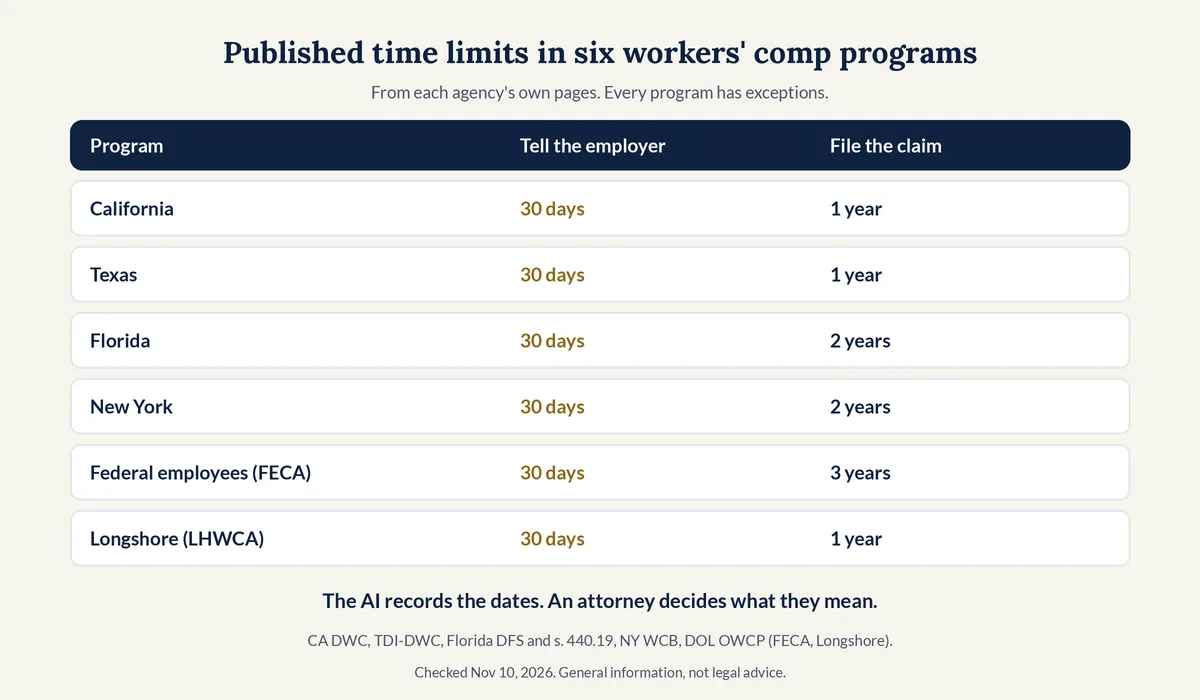
Workers' comp agencies publish two time limits that matter on a first call: how soon the worker should tell the employer, and how long the worker has to file a claim with the agency. In the six programs we checked, every one points to 30 days for telling the employer, and claim windows run from one to three years.
We compiled this table from each agency's own pages on Nov 10, 2026. It is a summary of public facts for planning your intake script, not advice to any caller. Each program has exceptions, such as illnesses that show up later. This is general information, not legal advice.
| Program | Tell the employer | File the claim | Where it says so |
|---|---|---|---|
| California | 30 days | Within a year (claim form DWC 1) | DWC, I was injured at work; DWC Fact Sheet D |
| Texas | 30 days | Within one year (DWC Form-041) | TDI-DWC, Injured employee FAQ |
| Florida | 30 days | Petition within 2 years (s. 440.19) | Florida DFS, Injured Worker FAQs; Section 440.19, Florida Statutes |
| New York | 30 days, in writing | Within two years (Form C-3) | NY WCB, Quick Guide for Injured Workers |
| Federal employees (FECA) | 30 days, written notice | Within 3 years | DOL OWCP, FECA FAQ |
| Longshore and harbor workers (LHWCA) | 30 days, written notice (LS-201) | Within one year (LS-203) | DOL OWCP, Longshore FAQ |
What the AI should do with these facts:
- Record both dates the caller gives, the injury date and the date the employer was told, and put them first in the summary.
- Never count days or tell a caller whether they are still on time. Agencies list exceptions, and applying them is the attorney's job.
- Flag a date the firm cares about. If your rules say an injury reported more than 30 days later is urgent, the AI can flag it without saying why to the caller.
- Ask which state. A worker hurt in one state and based in another, or a federal or dock worker, may fall under different rules.
Our AI receptionist guide for employment law firms covers a different set of deadlines, the EEOC charge windows, along with calls about firing for reporting an injury. Car crashes on the job can also bring a claim against another driver; our guide to answering personal injury calls covers that intake.
Which workers' comp calls should be flagged as urgent?
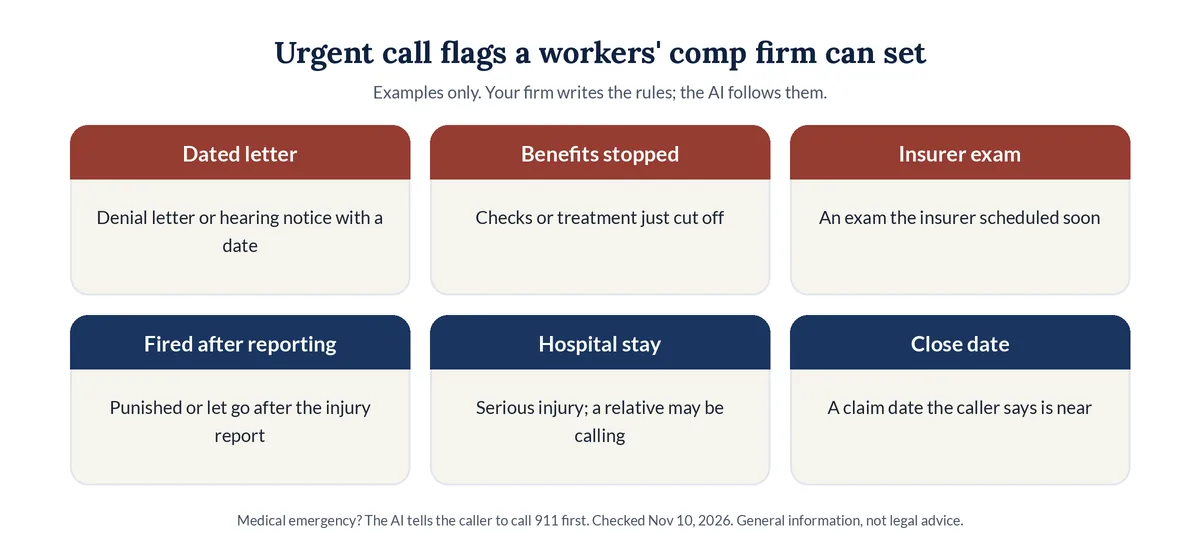
Your firm decides what is urgent, and the AI follows those rules. Common choices are a denial letter or hearing notice with a date on it, benefits that just stopped, an exam the insurer scheduled soon, a worker fired or punished after reporting an injury, a serious injury or hospital stay, and a claim date the caller says is close.
Two public facts behind common urgent rules: California's DWC says "It's illegal for your employer to punish or fire you for having a job injury or for requesting workers' compensation benefits," and the Longshore FAQ says it is unlawful to fire an employee "solely because he or she has filed a claim for compensation." The AI should not tell a caller they were wronged. It records what happened and when, then routes the call.
A simple routing plan:
- A date on a letter or notice, or benefits just stopped: urgent email to the on-call attorney, then a live transfer during office hours if someone picks up.
- Fired or punished after reporting the injury: urgent flag, with the dates the caller gives at the top of the summary.
- New injury, nothing pending: intake, then a booked consultation.
- Adjuster, employer, or clinic: detailed message for the assigned attorney or paralegal.
Our guide to after-hours call coverage for attorneys covers how to reach an on-call attorney at night without ringing the whole team.
What should an AI receptionist never tell a workers' comp caller?
An AI receptionist should never tell a workers' comp caller whether a claim is covered, what it is worth, whether they were at fault, how many days remain to file, or what the firm's fee is unless the firm approved exact wording. It should not give medical advice either. It records facts, books, transfers, and takes messages.
Fees are a good example of why. The Longshore FAQ says that under that federal program "an attorney may not collect a fee unless that fee is approved by the OWCP, the Office of Administrative Law Judges, or the courts," and that a contingency fee is not allowed. Fee rules differ by program and state, so the script should send fee questions to the attorney. Legal Touch AI's own list of things it will not do includes "Quote your fees, unless you approve the exact wording."
Recording rules apply to workers' comp calls like any other. Our guide to call recording consent rules for law firm phone lines covers the greeting, and our plain guide to AI receptionist ethics for attorneys covers supervision and confidentiality.
How should an AI receptionist handle workers' comp calls in Spanish?
A workers' comp firm should let callers choose English or Spanish at the start of the call and ask the same intake questions in both. Legal Touch AI answers in English and Spanish at no extra cost, per our pricing page. Write and approve the Spanish version of every question, then test it with a fluent speaker.
Agencies plan for more than one language too. California's DWC says its "fact sheets and claim forms are available in Chinese, Hmong, Korean, Spanish, Tagalog, and Vietnamese," and the Longshore FAQ says the employer notice to workers "must be posted both in English and Spanish or any other widely-used language utilized by employees."
Practical habits for bilingual intake:
- Ask the language question once, early, and record the answer in the summary.
- Spell names and emails back in the caller's language. Employer and carrier names are easy to mishear.
- Book the callback with someone who speaks the caller's language, or note that an interpreter is needed.
Our Spanish intake guide for bilingual immigration practices goes deeper on writing scripts in both languages.
What does an AI receptionist cost a workers' comp firm?
AI receptionists usually charge a flat monthly fee with a block of minutes, while many live answering services bill per minute or per call. Legal Touch AI's Done for You plan is $495 a month plus a $495 setup and includes 600 call minutes a month. Extra minutes are $0.25 each on every plan.
Six hundred minutes is about 200 three-minute calls, per our pricing page. Done for You Plus, marked coming soon, is $695 a month with 1,500 minutes for busier firms. Count a month of your calls, including adjuster and clinic calls, before you pick a plan. See Legal Touch AI plans and what each includes, and our cost comparison of legal answering services by call volume for other providers' published prices.
Not sure how many calls you miss today? Our guide to why law firms miss calls and what it costs shows how to count them.
Should an AI receptionist replace your workers' comp intake staff?
No, not while you test it. A well-trained intake person who knows your firm is better at nuance than any AI, such as hearing that a caller is in more pain than they admit. Unless you get far more calls than the team could answer, keep paid help during office hours and start the AI after hours.
That is also how our own FAQ answers the question: "Our AI follows your protocols reliably on every call, but a well-trained receptionist who knows your firm is better at nuance." Decide after you have read a few weeks of real call summaries.
How do you set up an AI receptionist for a workers' compensation firm?
Setting up an AI receptionist for a workers' comp firm means choosing which calls it answers, writing a caller-type question, listing the injury and reporting dates to capture, defining urgent flags, approving English and Spanish scripts, forwarding the firm's number, and testing new-injury, adjuster, and Spanish calls before launch.
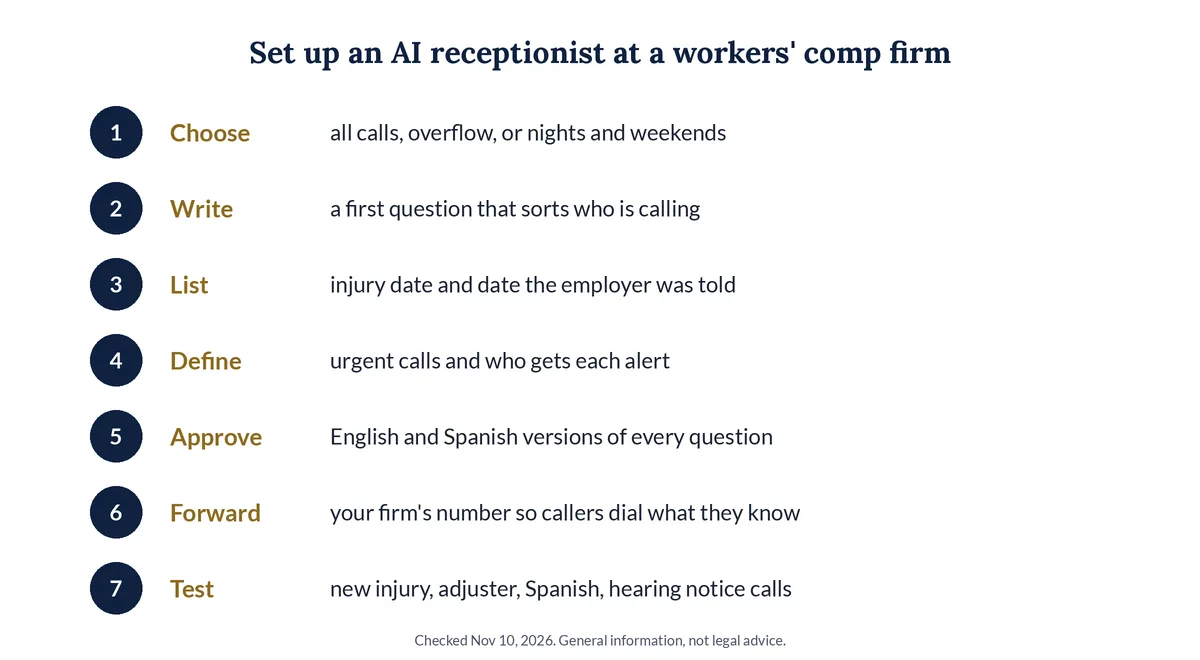
- Choose which calls the AI answers: all calls, overflow, or nights and weekends only.
- Write a first question that sorts injured workers, current clients, adjusters, employers, and clinics.
- List the dates to capture, starting with the injury date and the date the employer was told.
- Define urgent calls, such as a dated denial letter or stopped benefits, and who gets each alert.
- Approve the English and Spanish versions of every question and the topics the AI must never answer.
- Forward your firm's number to the AI so callers keep dialing the number they know.
- Test a new injury call, an adjuster call, a Spanish call, and a caller with a hearing notice, then read each summary.
How does Legal Touch AI handle workers' compensation calls?
Legal Touch AI answers forwarded calls for small U.S. law firms, says it is an AI in its first sentence, and follows the intake order your workers' comp firm approves. You decide which injury, denial, or hearing-notice calls are urgent enough for a live transfer, and it books the rest on your calendar.
From our home page, pricing page, and step-by-step walk-through of a Legal Touch AI call:
- It says what it is. The greeting identifies the AI and includes a recording notice, with the consent option you choose at setup.
- English and Spanish. It answers in English and Spanish, at no extra cost, with the same questions in either language.
- Transfers during office hours. You get an email first, then your phone rings. If you don't answer by the third ring, it books a time instead.
- Booking after hours. It checks your Google or Outlook calendar and offers two open times.
- A summary in about a minute. You get the caller's answers, the recording, and the transcript by email.
- Clear limits. It never gives legal advice or predicts a result, never decides conflicts, never promises your firm will take a case, and never pretends to be a person.
- Same number. You keep your number and your phone company, and you can switch the forwarding off any time.
Short answers to 25 more questions are in our AI receptionist FAQ for small law firms.
Why we wrote this guide
On Nov 10, 2026 we read seven page-one vendor pages for "ai receptionist for workers compensation lawyers" and "workers comp answering service." Six mentioned deadlines, but none gave a single day count from an agency and none linked to a state workers' comp agency or the Labor Department's workers' comp office (OWCP). Only one said it does not give legal advice. This guide fills those gaps with public sources. You can read more about the Legal Touch AI team.
What 7 page-one pages covered (our review, Nov 10, 2026)
| Topic | Pages that covered it (of 7) |
|---|---|
| Mentioned deadlines or a statute of limitations | 6 |
| Mentioned the insurance carrier, insurer, or adjuster | 5 |
| Showed prices or dollar figures | 4 |
| Mentioned Spanish | 3 |
| Said it does not give legal advice | 1 |
| Mentioned retaliation after a claim | 1 |
| Gave a day or year count for any deadline | 0 |
| Linked to a state workers' comp agency or a DOL workers' comp (OWCP) page | 0 |
Method: we saved seven distinct vendor pages from search results for the two phrases and counted topics with a script over each page's visible text (data.py). Competitors are not named here.
Hear it take a work injury call. Book a 15-minute Legal Touch AI demo and try a new injury call, an adjuster call, and a call in Spanish with your own intake questions.
Frequently asked questions
Can an AI receptionist tell an injured worker whether they have a workers' comp claim?
No. Whether a claim is covered, what it is worth, and whether it is on time are legal judgments for an attorney. The AI records the employer, the carrier, the injury date, and the date the employer was told, then books a consultation or transfers the call under the firm's rules.
Should the AI tell a caller how many days they have left to report an injury or file a claim?
No. It should record the dates the caller gives and put them first in the summary. Agencies publish general windows, such as 30 days to tell the employer in the six programs we checked, but each has exceptions. An attorney, not the phone script, applies them to a caller.
What should happen when a claims adjuster calls a workers' comp firm?
The AI takes the adjuster's name, company, phone, and claim number, then sends a message to the assigned attorney or paralegal. It does not discuss the case, confirm details, or schedule a recorded statement. Firms that also handle insurer-side work can set a separate script for that path.
Can an AI receptionist take workers' comp calls in Spanish?
Yes, if the service supports it and your firm approves the script. Legal Touch AI answers in English and Spanish at no extra cost and asks the same intake questions in either language. Have a fluent speaker test the Spanish questions, and note the caller's language so the callback matches it.
Should a workers' comp firm replace its receptionist with an AI?
Not while testing. A well-trained receptionist who knows your firm handles nuance better, such as a caller in pain who downplays an injury. Unless calls far outnumber what your team can answer, keep paid help during office hours and start the AI on nights, weekends, lunch, and overflow calls.
Legal Touch AI is not a law firm and does not provide legal advice. This article is general information, not legal advice about workers' compensation law, deadlines, or professional ethics rules. Agency rules change, so check current sources before you rely on them. Using Legal Touch AI does not create an attorney-client relationship.
Sources (checked Nov 10, 2026)
- U.S. Bureau of Labor Statistics, Employer-Reported Workplace Injuries and Illnesses, 2023-2024 (Jan 22, 2026): https://www.bls.gov/news.release/osh.nr0.htm
- U.S. Bureau of Labor Statistics, Table 1, total recordable injuries and illnesses, private industry, 2015-24: https://www.bls.gov/news.release/osh.t01.htm
- California Division of Workers' Compensation, I was injured at work: https://www.dir.ca.gov/dwc/InjuredWorker.htm
- California Division of Workers' Compensation, Fact Sheet D: https://www.dir.ca.gov/dwc/FactSheets/FactSheet_D.pdf
- Texas Department of Insurance, Division of Workers' Compensation, Injured employee FAQ: https://www.tdi.texas.gov/wc/employee/iefaqe.html
- Florida Department of Financial Services, Division of Workers' Compensation, Injured Worker FAQs: https://www.myfloridacfo.com/division/wc/employee/education-and-information/injured-worker-faqs
- Florida Statutes, Section 440.19, Time bars to filing petitions for benefits: https://www.leg.state.fl.us/statutes/index.cfm?App_mode=Display_Statute&URL=0400-0499/0440/Sections/0440.19.html
- New York State Workers' Compensation Board, Quick Guide for Injured Workers: https://www.wcb.ny.gov/content/main/TheBoard/ClaimantInformationPacket.pdf
- U.S. Department of Labor, OWCP, Federal Employees' Compensation Act FAQ: https://www.dol.gov/agencies/owcp/FECA/fec-faq
- U.S. Department of Labor, OWCP, Longshore and Harbor Workers' Compensation Act FAQ: https://www.dol.gov/agencies/owcp/dlhwc/FAQ/lsfaqs
- Legal Touch AI home: https://legaltouchai.com/
- Legal Touch AI how it works: https://legaltouchai.com/how-it-works/
- Legal Touch AI pricing: https://legaltouchai.com/pricing/